
Status bar left area (System and further links)
The status bar shows you the following information in the left area:

1. System
- Here you can see which system you are in and which version the corresponding system has
2. further menu entries
Support/Service
Send an e-mail that is sent directly to the ticket system of DeDeNet.
The sender's address used is the e-mail address of the backend user with whom you are logged into the portal. Furthermore, information about the product, version and licence is transmitted.
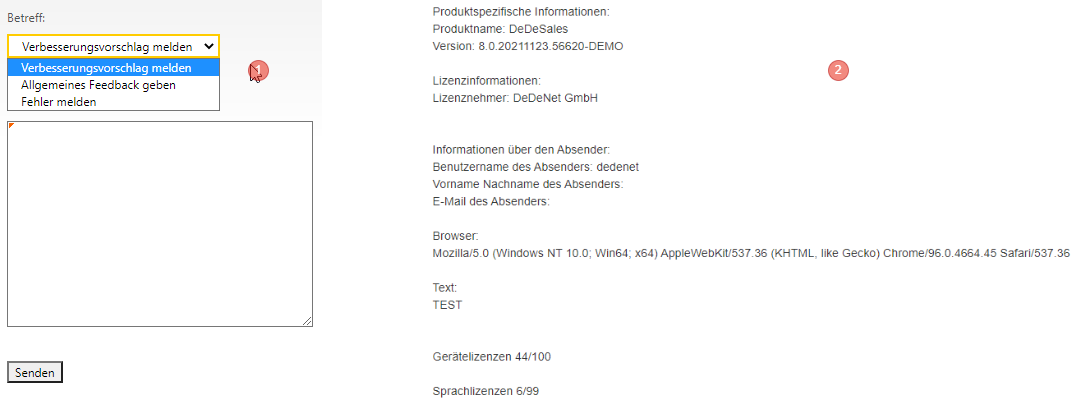
- Select the type of support case and compose individual text
- Incoming e-mail in the ticket system
Revision history
Before an upcoming update, check which amendments will be applied and whether your system environment is affected. Test the amendments before releasing for a live update.
DeDeSales - Wiki
You can reach the wiki via the link
Client Download
Use this page if you want to download an installation package, for example to deploy it in an MDM system.
eCom
If a shop licence is available, you will be redirected to your eCom shop in a new tab via the eCom entry.
About DeDeNet
You can reach the DeDeNet website via this link
3. User
Here you see with which user you are logged into the portal.
Via the arrow you can open the menu and additionally see which role is assigned to you. Furthermore, you can edit the settings for KPIs on the start page for your user here via "Edit settings".
4. Import Status
If the point is green, no current import is running. If it is red, a current import is running and you will be shown when it started if you hover the mouse over the point. Clicking the point with the mouse will take you to the import log of the current day.