
KPI Widgets Quotations
There are 2 widgets available in the Quotation type.
You can find KPI widgets in the "2 x 1 Widgets" type on the dashboard; further information on displaying them can be found here.
Quotations Current month
The basis for the count is the "Order date" field from the Quotation header.

- The number shows the quantity of Quotations in the Current month.
- Black, if the value is greater than 0
- Red, if the value is equal to 0.
- The blue chart shows the quantity of Quotations per Month in the last 12 Months.
| Quotation status | Included in count |
| Non-completed Quotation | x |
| Completed, not transferred Quotation | x |
| Completed, transferred Quotation | x |
| Deleted Quotation |
Quotation value Current month
The basis for the calculation of the monthly values is the "Order date" field from the Quotation header.
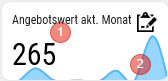
- The number shows the Quotation sum of the Current month without decimal places.
- Black, if the value is greater than 0
- Red, if the value is equal to 0.
- The blue chart shows the values per Month from the past 12 Months. In this example screenshot, significantly more Orders were written this month than in the past 12 Months.
| Quotation status | Value included in calculation |
| Non-completed Quotation | x |
| Completed, not transferred Quotation | x |
| Completed, transferred Quotation | x |
| Deleted Quotation |