
Complaint matrix
To create a complaint matrix, switch to the Basic configuration - Settings area and search or filter for the entry Complaint matrix.
Create or edit entries
Create new entries using the green +. Then fill in the fields according to your specifications.
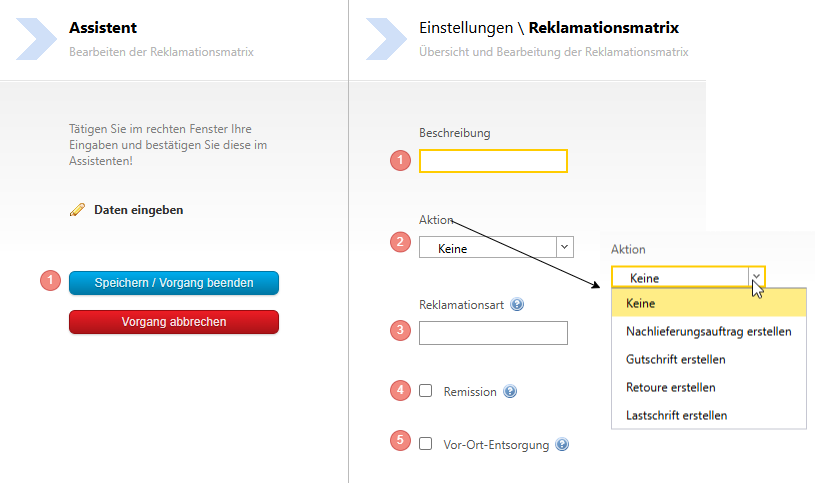
- meaningful naming for the level
- If desired, a promotion
- If the ERP processes the complaint type, it is stored here
- If the complaint is a remission, activate this checkbox. If the checkbox is set, this level is only available in the client for products where the field "Remission-capable" is also set in the item master data.
- Check if on-site disposal is carried out.
You do not have to fill in all fields immediately; this depends on the number of levels for your complaint process.
Add new level
Up to 5 levels of a complaint matrix are possible. To add new levels, right-click on an existing entry:

Add translations
In case several languages are used in your company, you can translate the complaint matrix.
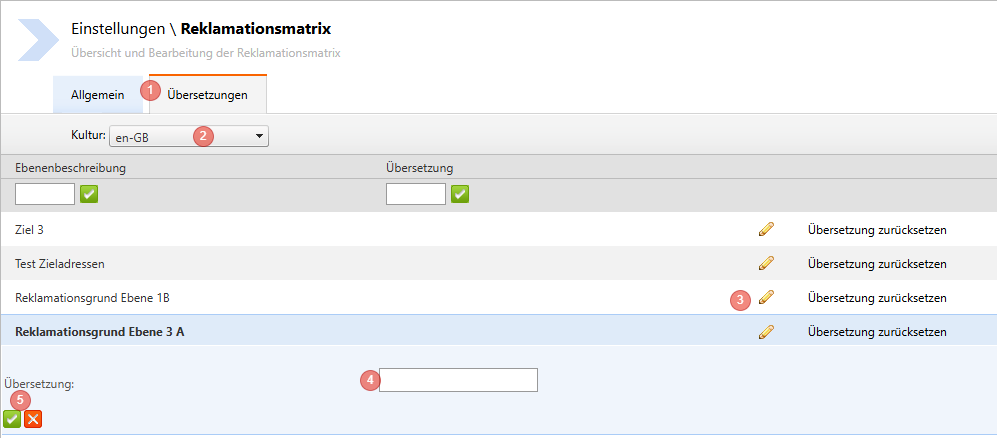
- Select the "Translations" tab
- Select the desired language from the Dropdown list
- Select the level you want to translate with the pencil
- Enter the new translation
- Save the translation with the green tick or discard the translation with the red X
Repeat the process for all levels. After the total import, the translations are available for all employees.