
Summary
Jobs and CRM queries consist of several parts, which are explained below and are the same in both cases. You add another level by right-clicking on the previous level.
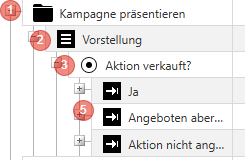
| Level | Explanation | General Information |
| 1 | This is the head and the name of the job. In addition, a customer list defines which customer this job is assigned to and in which period the job is visible. | Create is Mandatory! |
| 2 | This is a page within the job. Especially complex jobs can be divided into several pages to maintain clarity. | At least one page is Mandatory! |
| 3 | This is the question level. Here you specify what the employee has to do and how the information should be queried. Options include single choice, multiple choice, input fields, etc. | |
| 4 | This is the reply level. The reply level is not always available, but only for questions of the type "Single Choice", "Multiple Choice" or "Dropdown". The reply level contains the available reply options. | Only possible for certain questions, e.g. DropDown or SingleChoice |
| 5 | (not shown here) Below level 4, you can insert another level (page) by right-clicking. This page is only displayed if the employee has previously selected the reply from level 4. This allows you to ask further questions based on a reply selection. |