Tasks
| Title | Widget | Widget Description |
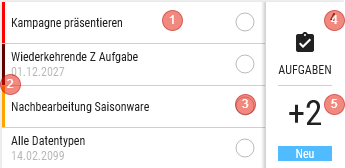
| Tasks | | - Number of tasks
- Top right corner in the colour of the highest priority.
- Prio Z: dark red
- Prio A: red
- Prio B: orange
- Prio C: none
Available in - Homepage dashboard
- Customer details
|
| | - Shows the first 4 tasks, sorted by Name
- If available, the end date is shown
- Click in the homepage dashboard: opens "Customers of a task"
- Click in the customer dashboard: opens the task for the customer.
- vertical bar on the left
- Prio Z: dark red
- Prio A: red
- Prio B: orange
- Prio C: none
- Processing status is symbolised by the circle.
- In the customer dashboard
- Empty: non-completed
- Half: In progress
- In the homepage dashboard
- The circle is filled proportionally, depending on how many customers have already completed the task.
- Number of tasks
- Click shows the task summary
-
Number of new tasks since the last transfer
Click opens the summary page, but shows only new tasks since the last transfer Available in - Homepage dashboard
- Customer details
|
Customers of a task
Title: "Name of the task"
Lists all customers for whom this task is still open
Grid
| Click | Swipe | Views |
| Opens the task for the customer | - Opens the customer
| - Table
|
Column definition
| Name | Visible | Sort | Full Text | Explanation |
| Colour code | ForceVisible |
|
| In progress: orange
|
| Customer columns | as with customers
| ASC (Name1)
| As with customers
|
|
| Start | VisibleOnlyLandscape |
|
| DD.MM.YYYY
|
| End | Visible |
|
| DD.MM.YYYY
|
Task summary
Title: Tasks
Grid
| Click | Swipe | Views |
| Opens the task |
| - Table
|
Column definition
| Name | Visible | Sort | Full Text | Explanation |
| Colour code | ForceVisible | ASC |
| Prio Z: dark red
Prio A: red
Prio B: orange
Prio C: none
|
| Task | Visible |
| Yes
|
|
| Start | VisibleOnlyLandscape |
|
| DD.MM.YYYY
|
| End | Visible |
|
| DD.MM.YYYY
|
| Open | Visible |
|
| - shows the number of still open entries
- Only via homepage dashboard
|
| Done | VisibleOnlyLandscape |
|
| - shows the number of completed entries
- Only via homepage dashboard
|
| Total | VisibleOnlyLandscape |
|
| - shows the number of all (open + done) entries
- Only via homepage dashboard
|
| Status | VisibleOnlyLandscape |
|
| - Non-completed
- In progress
- only via customer dashboard
|
| Priority | Hidden |
|
|
|
Task
Title: "Name of the task"
Task form
Save - Saves the task
Complete - Completes the task, it can no longer be edited
FAQ
Release