STATISTICS

Opportunities (win)

Title Widget Widget Description
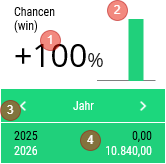
All Opportunities (win)
qbh4aDFtghAePd3N-drawing-9-1771500546.png
  1. Change in %
  2. Change graphically
  3. Switch display variants "Month" | "Month / Previous year" | "Year" | "KEY DATE" | "Financial year". 
  4. Display of the concrete numbers based on the selection from 3.

Available: 

  • Homepage dashboard

Click:

  • Switches to the detail view

Widget colouring:

  • red: fewer opportunities won in the observation period
  • green: more opportunities won in the observation period

The data refers to all won opportunities available on the device.

Opportunities (win)
CAx2ncY7F1lN4jZ7-drawing-9-1771500600.png
  1. Change in %
  2. Change graphically
  3. Switch display variants "Month" | "Month / Previous year" | "Year" | "KEY DATE" | "Financial year" 
  4. Display of the concrete numbers based on the selection from 3.

Available: 

  • Homepage dashboard

Click:

  • Switches to the detail view

Widget colouring:

  • red: fewer opportunities won in the observation period
  • green: more opportunities won in the observation period

The data refers to all won opportunities assigned to you as responsible or involved Employee.

Opportunities (open)

Title Widget Widget Description
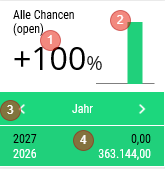
All Opportunities (open)
zk4XL4jbF8SqNkha-drawing-9-1771500630.png
  1. Change in %
  2. Change graphically
  3. Switch display variants "Month" | "Month / Previous year" | "Year" | "Financial year" 
  4. Display of the concrete numbers based on the selection from 3.

Available: 

  • Homepage dashboard

Click:

  • Switches to the detail view

Widget colouring:

  • red: fewer opportunities open in the observation period
  • green: more opportunities open in the observation period

The data refers to all won opportunities available on the device.

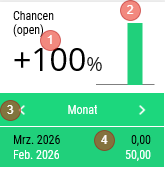
Opportunities (open)
929Knb3domkRgUdT-drawing-9-1771500765.png
  1. Change in %
  2. Change graphically
  3. Switch display variants "Month" | "Month / Previous year" | "Year" | "Financial year" 
  4. Display of the concrete numbers based on the selection from 3.

Available: 

  • Homepage dashboard

Click:

  • Switches to the detail view

Widget colouring:

  • red: fewer opportunities won in the observation period
  • green: more opportunities won in the observation period

The data refers to all won opportunities assigned to you as responsible or involved Employee.

Opportunities (lost)

Title Widget Widget Description
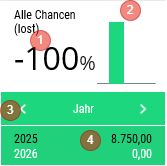
All Opportunities (lost)
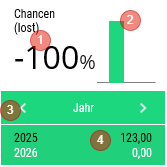
ccIoGM97nvusT2xQ-drawing-9-1771500807.png
  1. Change in %
  2. Change graphically
  3. Switch display variants "Month" | "Month / Previous year" | "Year" | "KEY DATE" | "Financial year"
  4. Display of the concrete numbers based on the selection from 3.

Available: 

  • Homepage dashboard

Click:

  • Switches to the detail view

Widget colouring:

  • green: fewer lost opportunities in the observation period
  • red: more lost opportunities in the observation period

The data refers to all lost opportunities available on the device.

Opportunities (lost)
KQ5uDVuSFQaHfLTo-drawing-9-1771500834.png
  1. Change in %
  2. Change graphically
  3. Switch display variants "Month" | "Month / Previous year" | "Year" | "KEY DATE" | "Financial year" 
  4. Display of the concrete numbers based on the selection from 3.

Available: 

  • Homepage dashboard

Click:

  • Switches to the detail view

Widget colouring:

  • green: fewer lost opportunities in the observation period
  • red: more lost opportunities in the observation period

The data refers to all lost opportunities assigned to you as responsible or involved Employee.

General

Kebab menu (image.png)

Type Menu item Explanation

Only one active entry is possible.

Year

Only one active entry is possible.

Financial year only visible if Financial year <> Year

Only one active entry is possible.

KEY DATE


------------------------------------    


Export


{{DDN-2@357#bkmrk-header}}

Grid

Click Swipe Views

  1. By swiping you reach the Document view with a preset filter.

  2. There are 3 swipe selections
    Opportunities <Current year>
    Opportunities <Previous year>
    Opportunities <Year before last>
  1. Table

{{DDN-2@357#bkmrk-filter}}

Special feature in the filter for completed opportunities:

The filter can be extended to the Closing code

Special feature in the filter for opportunities In progress:

The filter can be extended to the Level

FAQ


Release