
Order suggestion
| Title | Widget | Widget Description |
| Order suggestion |
| Available:
|

General
Title bar
| Icon | Explanation |
|
| On iOS/Android the share function is called. On UWP the save dialog opens. |
|
| Switches to the contact mask of the active customer. |


Panel: E-Mail Recipient
Multiple selection is possible.
Conditions
The following recipients are displayed if an e-mail address is maintained:
- Contacts of the active customer.
- The own employee
- Employees of type "Backoffice"
- Employees of type "Dispatcher"
- If the active customer has an e-mail address stored, the grid contains an additional entry "From Master data (...)".
Grid
| Click | Swipe | Views |
| Marks the entry as recipient of the e-mail | |
|
Column definition
| Name | Visible | Sort | Full Text | Explanation |
| Checkbox | Forced | |||
| Title | Landscape | |||
| Last name | Always | Ascending | Yes | |
| First name | Always | Yes | ||
| Always | Yes | |||
| Item | Hidden | |||
| Department | Hidden |
Panel: Correspondence (email only)
Enter a text here for the e-mail correspondence.
Texts entered here can be interpreted as HTML if it is valid HTML.
  |
1.
From version 21:
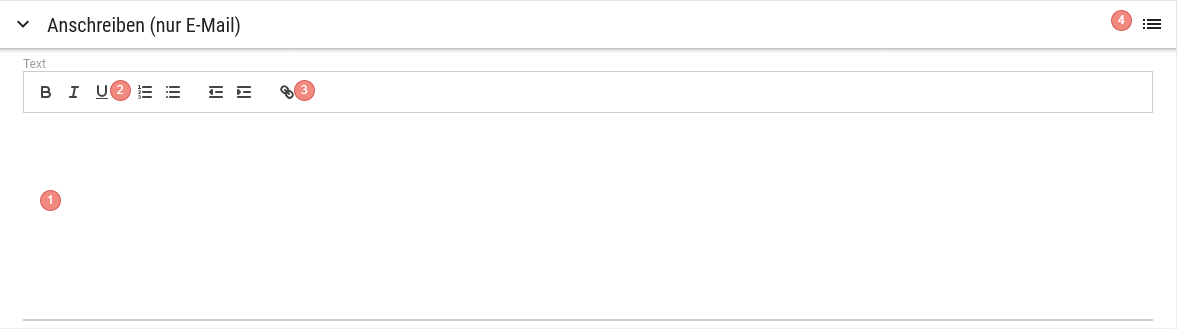
Since version 21, a formatting bar (WYSIWYG editor) is available above the text input. The text no longer needs to be entered manually as HTML.
Grid Order suggestion Text blocks
| Click | Swipe | Views |
| Marks the text block as e-mail correspondence | |
|
Column definition
| Name | Visible | Sort | Full Text | Explanation |
| Category | Forced | |||
| Key | Landscape | |||
| Culture | Always | Ascending | ||
| Client | Always | |||
| Value | Always | Yes |
Panel: Attachments
Since version 21, an additional panel is available below the Correspondence, through which documents can be selected as email attachments.
Grid
Column definition
Tick the checkbox so that the additional attachment is added to the email. Type Always
Yes
"ORDER": documents additionally attached to the order suggestion can be uploaded here.
"Employee": documents centrally provided to the employee via import
Yes
File name Always Ascending Yes
Panel: Fax Recipient
Multiple selection is possible.
Conditions
The following recipients are displayed if a fax number is maintained:
- Contacts of the active customer.
- The own employee
- Employees of type "Backoffice"
- Employees of type "Dispatcher"
- If the active customer has a fax number stored, the grid contains an additional entry "From Master data (...)".
Grid
| Click | Swipe | Views |
| Marks the entry as recipient of the fax | |
|
Column definition
| Name | Visible | Sort | Full Text | Explanation |
| Checkbox | Forced | |||
| Title | Landscape | |||
| Last name | Always | Ascending | Yes | |
| First name | Always | Yes | ||
| Fax | Always | Yes | ||
| Item | Hidden | |||
| Department | Hidden |
Action buttons
| Name | Function | Visibility |
| Send | Sends the order suggestion to the e-mail addresses or fax devices of the selected recipients. |
FAQ
Where can I maintain the textText blocks for "Correspondence (email only)"?
You can maintain the texts in the Codecode tables in the backend. The areatype is called "Order suggestion Text blocks".
Why don'tdo I not see the Fax Recipientrecipient area?section?
You need a corresponding fax server licence for this item to be visible.