
Document overview
| Title | Widget | Widget description |
| Documents |   |
Click:
Available:
|
General
Kebab menu (
 )
)

| Type | Menu item | Explanation |
|
| Orders | Basic configuration \ Roles \ <Role> \ STATISTICS / documents |
  | Delivery notes | Basic configuration \ Roles \ <Role> \ STATISTICS / documents |
|
| Credit notes | Basic configuration \ Roles \ <Role> \ STATISTICS / documents |
| Invoices | Basic configuration \ Roles \ <Role> \ STATISTICS / documents |
|
| Quotations | Basic configuration \ Roles \ <Role> \ STATISTICS / documents |
|
| Contracts | Basic configuration \ Roles \ <Role> \ STATISTICS / documents |
|
| Direct debit notes | Basic configuration \ Roles \ <Role> \ STATISTICS / documents |
|
| Stocktaking notes | Basic configuration \ Roles \ <Role> \ STATISTICS / documents |
|
| Unpaid invoices | Basic configuration \ Roles \ <Role> \ STATISTICS |


Grid
| Click | Swipe | Views |
| Opens the document |
|
Column definition
| Name | Visible | Sort | Full Text | Explanation |
| Colour code | Blue: Prospect / Transfer customer Blue is before "Not assigned" and before Delivery block. |
Customer columns
| Name | Visible | Sort | Full text | Explanation |
| Colour code | Forced | Purple: Key account Blue: Prospect, transfer customer, new customer Red: Delivery block Orange: Not assigned
Purple has the highest priority | ||
| Name 1 | Visible | ASC | Yes | |
| Name 2 | Hidden | Yes | ||
| Name 3 | Hidden | Yes | ||
| Customer | Landscape | Yes | ||
| Street | Landscape | Yes | ||
| Postcode | Landscape | Yes | ||
| City | Visible | Yes | ||
| ABC Status | Hidden | |||
| Country | Hidden | |||
| Telephone number | Hidden | |||
| Fax number | Hidden | |||
| Hidden | Yes | |||
| Sales office | Hidden | |||
| Group of sales agents | Hidden | |||
| Price list | Hidden | |||
| Last visit | Hidden | Automatically determined. | ||
| Visiting frequency | Hidden | |||
| Due date | Hidden | The text for this column is determined as follows: No invoice discount: no visiting frequency present in the customer master data No visit: no last visit present Not due: Last visit + visiting frequency > current calendar week Now: Last visit + visiting frequency == current calendar week Overdue (1): Last visit + visiting frequency < current calendar week Overdue (2): Last visit + (visiting frequency * 2) <= current calendar week | ||
| Visit duration | Hidden | |||
| Tour | Hidden | |||
| Start week | Hidden | |||
| Client | Hidden | |||
| Attribute1-16 | Hidden | |||
| Type (customer) | Hidden | |||
| Currency | Hidden | |||
| Area | Hidden | |||
| Customer since | Hidden | |||
| State | Hidden | |||
| Main contact | Hidden | |||
| Delivery block | Hidden | |||
| Incoterms | Hidden | |||
| Incoterms 2 | Hidden | |||
| Terms of payment | Hidden | |||
| Terms of delivery | Hidden | |||
| Customer group | Hidden | |||
| Account group | Hidden | |||
| Homepage | Hidden | |||
| Listing | Hidden | |||
| Send invoice separately | Hidden | |||
| Delivery note without price | Hidden | |||
| ILN | Hidden | |||
| Invoice discount | Hidden | |||
| Form of payment | Hidden | |||
| Customer category | Hidden | |||
| Price group code | Hidden | |||
| Association | Hidden | |||
| Advertising material | Hidden | |||
| Tax Ident Number | Hidden | |||
| VAT ID | Hidden | |||
| Status | Hidden | |||
| Order block | Hidden | |||
| Assigned | Hidden | |||
| Abbreviation | Hidden | Yes |
Document items
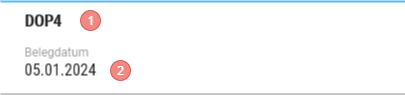
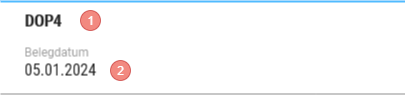
- Document number
- Document date
Kebab menu (
| Type | Menu item | Explanation |
| Document additional information | Is displayed if data is available.
|
Column definition
| Name | Visible | Sort | Full Text | Explanation |
| Picture | VisibleOnlyLandscape |
| ||
| Item | VisibleOnlyLandscape | | ||
| Product | VisibleOnlyLandscape | | ||
| Name | Visible | | ||
| Quantity | Visible | | ||
| Amount | Visible | | ||
| Batch | Hidden | | ||
| Total | Visible | |
Summary row at the bottom edge of the grid
FAQ
Release
From version 16
The last selection of the document type is saved and reused on the next call, unless an explicit document type is specified by the call.