
Settings - Per diem rates and Per diem rate deductions
Per diem rates
If you have licensed the Daily reports module, you can enter per diem rates and corresponding deductions here.
Multiple rules can be stored, e.g. for absences of 8 and 24 hours, or different amounts for different cultures.
Use the green plus at the head of the panel for this purpose.
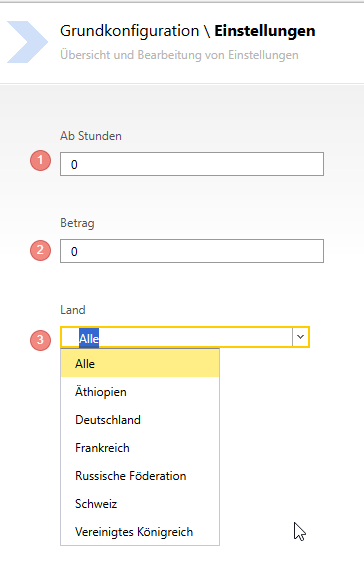
- The number of hours from which the per diem rate should apply
- Set the amount to be calculated
- Specify for which countries the per diem rates should apply
Per diem rate deductions
In the area of per diem rate deductions, you can specify a validity period in case there are tax changes over the turn of the year.
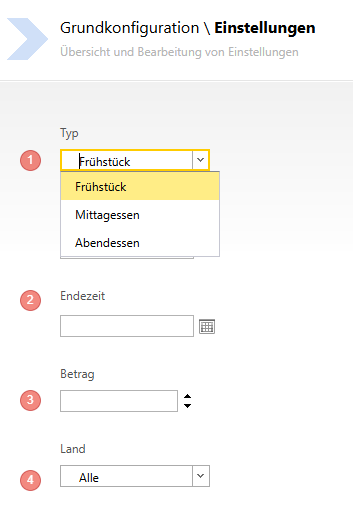
- Enter the type to be deducted from the expenses
- Set the validity period, if desired
- The amount to be deducted from the expenses
- Specify for which countries the rules should apply
The values are required so that the Expense report can be generated correctly.