
Level 3 – Creating a Question Using the Free Text Example
At least one question must be created on each page; otherwise, the pages will not be displayed
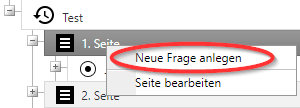
Questions are created by right-clicking on the page:

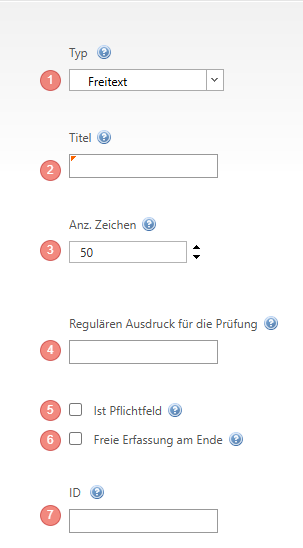

1. Type:
| Question Type | Behaviour |
| Single Choice | Only one answer option can be selected at a time. |
| Multiple Choice | Multiple answer options can be selected |
| Free text | Free text without line breaks. The number of characters can be set arbitrarily |
| Confirmation | A field that can be ticked |
| Number | Whole number |
| Date | |
| HTMLInfo | Required to start JAVA Script commands |
| Time | |
| Dropdown list | Several answer options are displayed, but only one can be selected |
| Decimal | Decimal number |
| Signature | Provides a field for a signature |
| Picture | Pictures can be taken with the Camera or loaded from the gallery |
| Checks whether the e-mail complies with valid rules, i.e. contains an @ and a domain ending | |
| URL | Validity of the address is checked based on the domain ending |
| Telephone | Telephone numbers must contain a / (slash) |
| Text area | Free text where line breaks can be made or, for example, smileys can be inserted on the tablet |
| Text info | Used as pure display text |
| Promotion | Here you can execute an action via JavaScript programming |
| Hidden | This field can be used, for example, to compare previous values hiddenly. Requires Java programming |
General Information: Single Choice, Multiple Choice, Dropdown list require answer options.
2. Assign the Title of the question
3. For Free text, you can influence the number of characters to be entered
4. For Free text, you have the option to insert a regex expression for validation, e.g. \d+ allows only numbers
5. Tick Mandatory if an answer is required for the question. Without an answer, the job cannot be left.
6. Here you can Allow additional texts
7. The ID must be assigned mandatorily so that the job can be evaluated, see also point 9 from chapter Level 1.