
Sales Pipeline - Creating and Editing Leads
To be able to create leads, you must first maintain the lead definition. If you have questions about this, go to the Tasks & CRM section.
You create leads under Sales Pipeline - Leads with the green + "Create a new lead definition".

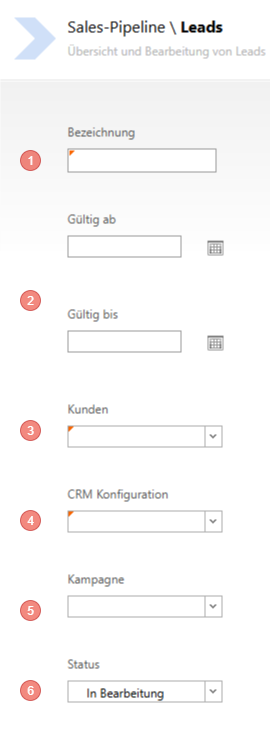
- Choose a meaningful Name
- Specify the validity period
- Assign the previously selected Customer list
- Assign the previously created CRM Configuration
- If a Campaign is to be linked, assign the Campaign here
- Set the Status
Edit Lead Definitions afterwards
To do this, click on an existing definition and you can change the pre-filled fields. However, note that this could distort the evaluations.
Email Templates
In the Assistant step "Email Templates" you select via checkbox which centrally maintained email templates (see Settings - Email Templates (Opportunities & Leads)) are available in the client for this lead definition. Only activated templates are selectable in the "Email" widget in the client. From version 21 onwards.