
Order support – Tour suggestion
Create suitable tours for you in the backend under Order support – Tour suggestion. In our example, these are the individual days of the week:
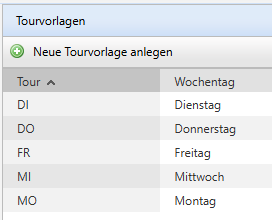
These tours are transferred to the Tour field of the Debtors. That means you define via the Master data on which day a Customer can be visited.
Excel import of the tour if the interface cannot provide it.
Requires the Tour optimisation licence
If you cannot provide the tour via the interface, it is possible to maintain it via an Excel import. This also applies to Visiting frequency and Start week.
To do this, select Bulk change under the menu item Tour optimisation – Master data tab.
Download the template and fill it out according to your requirements.
Then import the Excel file again.

Set all the necessary rights in the Role that you want to allow the Employee.
Basic configuration – Roles - <Role> - DAILY REPORT / calendar management
If you want to give the Employee the ability to change the predefined tour from the backend in the Customer's Master data, then grant them the right "Edit tour" in the DAILY REPORT area.
If the setting "Master data are maintained in DeDeSales" is enabled, the defined fields of the setting will not be overwritten during import from the ERP system.