# Tasks

# Tasks

<table id="bkmrk-titel-verf%C3%BCgbar-widg" style="border-collapse:collapse;width:100%;height:143.391px;"><colgroup><col style="width:12.6341%;"></col><col style="width:30.9829%;"></col><col style="width:56.383%;"></col></colgroup> <thead> <tr style="height:29.7969px;"> <td style="height:29.7969px;">Title</td> <td style="height:29.7969px;">Widget</td> <td style="height:29.7969px;">Widget Description</td> </tr> </thead> <tbody> <tr style="height:113.594px;"> <td style="height:113.594px;">Tasks</td> <td style="height:113.594px;"><div drawio-diagram="1876">[![Y6JwL9W92DjOoxSL-drawing-9-1750931210.png](https://en.wiki.dedesales.de/uploads/images/drawio/2026-10/U6BuHJq1YoCD50qC-drawing-8-1793274469.png)](https://wiki.dedesales.de/uploads/images/gallery/2025-06/jiIOQTAkn7m5jiYc-image.png)</div>

 </td> <td style="height:113.594px;">

1. Number of tasks
2. Top right corner in the colour of the highest priority. 
    - Prio Z: dark red
    - Prio A: red
    - Prio B: orange
    - Prio C: none
 

Available in

- Homepage dashboard
- Customer details
 
 </td> </tr> <tr> <td>  
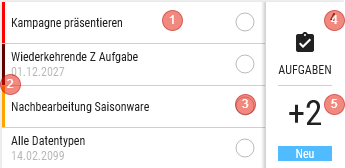
</td> <td><div drawio-diagram="1885"><img src="https://en.wiki.dedesales.de/uploads/images/gallery/2026-08/6U6OSdD0Ni2OY6Il-gkwygt8opr3fz9to-drawing-9-1751265677.png" alt="gkwygt8oPr3fz9TO-drawing-9-1751265677.png"/></div>

 </td> <td>

1. Shows the first 4 tasks, sorted by Name 
    - If available, the end date is shown
    - Click in the homepage dashboard: opens "Customers of a task"
    - Click in the customer dashboard: opens the task for the customer.
2. vertical bar on the left 
    - Prio Z: dark red
    - Prio A: red
    - Prio B: orange
    - Prio C: none
3. Processing status is symbolised by the circle. 
    - In the customer dashboard  
        
        - Empty: non-completed
        - Half: In progress
    -  In the homepage dashboard  
        
        - The circle is filled proportionally, depending on how many customers have already completed the task.
4. Number of tasks 
    - Click shows the task summary
5. Number of new tasks since the last transfer
    
    Click opens the summary page, but shows only new tasks since the last transfer
 

Available in

- Homepage dashboard
- Customer details
 
 </td> </tr> </tbody> </table>

### Customers of a task

Title:  "Name of the task"

Lists all customers for whom this task is still open

#### Grid

<table id="bkmrk-click-swipe-ansichte" style="border-collapse:collapse;width:100%;height:101px;"><colgroup><col style="width:33.3731%;"></col><col style="width:33.3731%;"></col><col style="width:33.3731%;"></col></colgroup> <thead> <tr> <td>Click</td> <td>Swipe</td> <td>Views</td> </tr> </thead> <tbody> <tr> <td>Opens the task for the customer</td> <td>

1. Opens the customer
 
 </td> <td>

1. Table
 
 </td> </tr> </tbody> </table>

##### Column definition

<table id="bkmrk-bezeichnung-sichtbar" style="border-collapse:collapse;width:100%;height:297.969px;"><colgroup><col style="width:28.7247%;"></col><col style="width:14.6603%;"></col><col style="width:11.4401%;"></col><col style="width:7.86864%;"></col><col style="width:37.4255%;"></col></colgroup> <thead> <tr style="height:29.7969px;"> <td style="height:29.7969px;">Name</td> <td style="height:29.7969px;">Visible</td> <td style="height:29.7969px;">Sort</td> <td style="height:29.7969px;">Full Text</td> <td style="height:29.7969px;">Explanation</td> </tr> </thead> <tbody> <tr style="height:29.7969px;"> <td style="height:29.7969px;">Colour code</td> <td style="height:29.7969px;">ForceVisible</td> <td style="height:29.7969px;">  
</td> <td style="height:29.7969px;">  
</td> <td style="height:29.7969px;">In progress: orange  
</td> </tr> <tr style="height:29.7969px;"> <td style="height:29.7969px;">Customer columns</td> <td style="height:29.7969px;">as with customers  
</td> <td style="height:29.7969px;">ASC (Name1)  
</td> <td style="height:29.7969px;">As with customers  
</td> <td style="height:29.7969px;">  
</td> </tr> <tr style="height:29.7969px;"> <td style="height:29.7969px;">Start</td> <td style="height:29.7969px;">VisibleOnlyLandscape</td> <td style="height:29.7969px;">  
</td> <td style="height:29.7969px;">  
</td> <td style="height:29.7969px;">DD.MM.YYYY  
</td> </tr> <tr style="height:29.7969px;"> <td style="height:29.7969px;">End</td> <td style="height:29.7969px;">Visible</td> <td style="height:29.7969px;">  
</td> <td style="height:29.7969px;">  
</td> <td style="height:29.7969px;">DD.MM.YYYY  
</td> </tr> </tbody> </table>

### Task summary

Title:  Tasks

#### Grid

<table id="bkmrk-click-swipe-ansichte-1" style="border-collapse:collapse;width:100%;height:101px;"><colgroup><col style="width:33.3731%;"></col><col style="width:33.3731%;"></col><col style="width:33.3731%;"></col></colgroup> <thead> <tr> <td>Click</td> <td>Swipe</td> <td>Views</td> </tr> </thead> <tbody> <tr> <td>Opens the task </td> <td> </td> <td>

1. Table
 
 </td> </tr> </tbody> </table>

##### Column definition

<table id="bkmrk-bezeichnung-sichtbar-1" style="border-collapse:collapse;width:100%;height:432.344px;"><colgroup><col style="width:28.7247%;"></col><col style="width:14.6603%;"></col><col style="width:11.4401%;"></col><col style="width:7.86864%;"></col><col style="width:37.4255%;"></col></colgroup> <thead> <tr style="height:29.7969px;"> <td style="height:29.7969px;">Name</td> <td style="height:29.7969px;">Visible</td> <td style="height:29.7969px;">Sort</td> <td style="height:29.7969px;">Full Text</td> <td style="height:29.7969px;">Explanation</td> </tr> </thead> <tbody> <tr style="height:80.1875px;"> <td style="height:80.1875px;">Colour code</td> <td style="height:80.1875px;">ForceVisible</td> <td style="height:80.1875px;">ASC</td> <td style="height:80.1875px;">  
</td> <td style="height:80.1875px;">Prio Z: dark red  
Prio A: red  
Prio B: orange  
Prio C: none  
</td> </tr> <tr style="height:46.5938px;"> <td style="height:46.5938px;">Task</td> <td style="height:46.5938px;">Visible</td> <td style="height:46.5938px;">  
</td> <td style="height:46.5938px;">Yes  
</td> <td style="height:46.5938px;">  
</td> </tr> <tr style="height:46.5938px;"> <td style="height:46.5938px;">Start</td> <td style="height:46.5938px;">VisibleOnlyLandscape</td> <td style="height:46.5938px;">  
</td> <td style="height:46.5938px;">  
</td> <td style="height:46.5938px;">DD.MM.YYYY  
</td> </tr> <tr style="height:29.7969px;"> <td style="height:29.7969px;">End</td> <td style="height:29.7969px;">Visible</td> <td style="height:29.7969px;">  
</td> <td style="height:29.7969px;">  
</td> <td style="height:29.7969px;">DD.MM.YYYY  
</td> </tr> <tr style="height:29.7969px;"> <td style="height:29.7969px;">Open</td> <td style="height:29.7969px;">Visible</td> <td style="height:29.7969px;">  
</td> <td style="height:29.7969px;">  
</td> <td style="height:29.7969px;">

- shows the number of still open entries
- Only via homepage dashboard
 
 </td> </tr> <tr style="height:46.5938px;"> <td style="height:46.5938px;">Done</td> <td style="height:46.5938px;">VisibleOnlyLandscape</td> <td style="height:46.5938px;">  
</td> <td style="height:46.5938px;">  
</td> <td style="height:46.5938px;">

- shows the number of completed entries
- Only via homepage dashboard
 
 </td> </tr> <tr style="height:46.5938px;"> <td style="height:46.5938px;">Total</td> <td style="height:46.5938px;">VisibleOnlyLandscape</td> <td style="height:46.5938px;">  
</td> <td style="height:46.5938px;">  
</td> <td style="height:46.5938px;">

- shows the number of all (open + done) entries
- Only via homepage dashboard
 
 </td> </tr> <tr style="height:46.5938px;"> <td style="height:46.5938px;">Status</td> <td style="height:46.5938px;">VisibleOnlyLandscape</td> <td style="height:46.5938px;">  
</td> <td style="height:46.5938px;">  
</td> <td style="height:46.5938px;">

- Non-completed
- In progress
- only via customer dashboard
 
 </td> </tr> <tr style="height:29.7969px;"> <td style="height:29.7969px;">Priority</td> <td style="height:29.7969px;">Hidden</td> <td style="height:29.7969px;">  
</td> <td style="height:29.7969px;">  
</td> </tr> </tbody> </table>

#### Task

Title: "Name of the task"  
Task form

##### Button below 

Save - Saves the task

Complete - Completes the task, it can no longer be edited

<details id="bkmrk-faq-wie-steuere-ich-"> <summary>FAQ</summary>

 </details><details id="bkmrk-release-ab-version-1"> <summary>Release</summary>

</details>