# STATISTICS

### Opportunities (win)

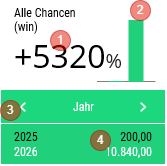
<table id="bkmrk-titel-widget-widget-" style="border-collapse:collapse;width:100%;height:456.64px;"><colgroup><col style="width:26.1025%;"></col><col style="width:12.2765%;"></col><col style="width:61.621%;"></col></colgroup> <thead> <tr style="height:29.7969px;"> <td style="height:29.7969px;">Title</td> <td style="height:29.7969px;">Widget</td> <td style="height:29.7969px;">Widget Description</td> </tr> </thead> <tbody> <tr style="height:325.109px;"> <td style="height:325.109px;">All Opportunities (win)</td> <td style="height:325.109px;"><div drawio-diagram="2200"><img src="https://en.wiki.dedesales.de/uploads/images/gallery/2026-08/Jg7ck9QP8KGYHKoA-qbh4adftghaepd3n-drawing-9-1771500546.png" alt="qbh4aDFtghAePd3N-drawing-9-1771500546.png"/></div>

 </td> <td style="height:325.109px;">

1. Change in %
2. Change graphically
3. Switch display variants "Month" \| "Month / Previous year" \| "Year" \| "KEY DATE" \| "Financial year".
4. <span class="wpaicg-chat-message"></span>
    
     Display of the concrete numbers based on the selection from 3.
 

Available:

- Homepage dashboard
 

Click:

- Switches to the detail view
 

Widget colouring:

- red: fewer opportunities won in the observation period
- green: more opportunities won in the observation period
 

The data refers to all won opportunities available on the device.

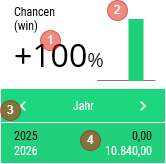
 </td> </tr> <tr style="height:101.734px;"> <td style="height:101.734px;">Opportunities (win)</td> <td style="height:101.734px;"><div drawio-diagram="2201"><img src="https://en.wiki.dedesales.de/uploads/images/gallery/2026-08/sRE5qg8DT0YtHEcA-cax2ncy7f1ln4jz7-drawing-9-1771500600.png" alt="CAx2ncY7F1lN4jZ7-drawing-9-1771500600.png"/></div>

 </td> <td style="height:101.734px;">

1. Change in %
2. Change graphically
3. Switch display variants "Month" \| "Month / Previous year" \| "Year" \| "KEY DATE" \| "Financial year"
4. <span class="wpaicg-chat-message"></span>
    
     Display of the concrete numbers based on the selection from 3.
 

Available:

- Homepage dashboard
 

Click:

- Switches to the detail view
 

Widget colouring:

- red: fewer opportunities won in the observation period
- green: more opportunities won in the observation period
 

The data refers to all won opportunities assigned to you as responsible or involved Employee.

 </td> </tr> </tbody> </table>

### Opportunities (open)

<table id="bkmrk-titel-verf%C3%BCgbar-widg" style="border-collapse:collapse;width:100%;height:143.391px;"><colgroup><col style="width:26.2217%;"></col><col style="width:12.0532%;"></col><col style="width:61.8443%;"></col></colgroup> <thead> <tr style="height:29.7969px;"> <td style="height:29.7969px;">Title</td> <td style="height:29.7969px;">Widget</td> <td style="height:29.7969px;">Widget Description</td> </tr> </thead> <tbody> <tr style="height:113.594px;"> <td style="height:113.594px;">All Opportunities (open)</td> <td style="height:113.594px;"><div drawio-diagram="2202"><img src="https://en.wiki.dedesales.de/uploads/images/gallery/2026-08/yWCHwAWFiJhMpGi9-zk4xl4jbf8sqnkha-drawing-9-1771500630.png" alt="zk4XL4jbF8SqNkha-drawing-9-1771500630.png"/></div>

 </td> <td style="height:113.594px;">

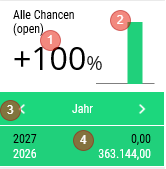
1. Change in %
2. Change graphically
3. Switch display variants "Month" \| "Month / Previous year" \| "Year" \| "Financial year"
4. <span class="wpaicg-chat-message"></span>
    
     Display of the concrete numbers based on the selection from 3.
 

Available:

- Homepage dashboard
 

Click:

- Switches to the detail view
 

Widget colouring:

- red: fewer opportunities open in the observation period
- green: more opportunities open in the observation period
 

The data refers to all won opportunities available on the device.

 </td> </tr> <tr> <td>Opportunities (open)</td> <td><div drawio-diagram="2203"><img src="https://en.wiki.dedesales.de/uploads/images/gallery/2026-08/gMhORF5gfzllLSg5-929knb3domkrgudt-drawing-9-1771500765.png" alt="929Knb3domkRgUdT-drawing-9-1771500765.png"/></div>

 </td> <td>

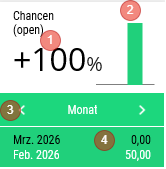
1. Change in %
2. Change graphically
3. Switch display variants "Month" \| "Month / Previous year" \| "Year" \| "Financial year"
4. <span class="wpaicg-chat-message"></span>
    
     Display of the concrete numbers based on the selection from 3.
 

Available:

- Homepage dashboard
 

Click:

- Switches to the detail view
 

Widget colouring:

- red: fewer opportunities won in the observation period
- green: more opportunities won in the observation period
 

The data refers to all won opportunities assigned to you as responsible or involved Employee.

 </td> </tr> </tbody> </table>

### Opportunities (lost)

<table id="bkmrk-titel-widget-widget--1" style="border-collapse:collapse;width:100%;"><colgroup><col style="width:25.8641%;"></col><col style="width:12.8725%;"></col><col style="width:61.2634%;"></col></colgroup> <thead> <tr> <td style="height:29.7969px;">Title</td> <td style="height:29.7969px;">Widget</td> <td style="height:29.7969px;">Widget Description</td> </tr> </thead> <tbody> <tr> <td>All Opportunities (lost)</td> <td><div drawio-diagram="2204"><img src="https://en.wiki.dedesales.de/uploads/images/gallery/2026-08/n36JdnsezaNkkq4i-cciogm97nvust2xq-drawing-9-1771500807.png" alt="ccIoGM97nvusT2xQ-drawing-9-1771500807.png"/></div>

 </td> <td>

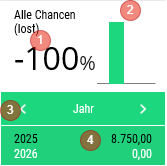
1. Change in %
2. Change graphically
3. Switch display variants "Month" \| "Month / Previous year" \| "Year" \| "KEY DATE" \| "Financial year"
4. <span class="wpaicg-chat-message"></span>
    
     Display of the concrete numbers based on the selection from 3.
 

Available:

- Homepage dashboard
 

Click:

- Switches to the detail view
 

Widget colouring:

- green: fewer lost opportunities in the observation period
- red: more lost opportunities in the observation period
 

The data refers to all lost opportunities available on the device.

 </td> </tr> <tr> <td>Opportunities (lost)</td> <td><div drawio-diagram="2205"><img src="https://en.wiki.dedesales.de/uploads/images/gallery/2026-08/vmtmtGyf7baCql80-kq5udvusfqahflto-drawing-9-1771500834.png" alt="KQ5uDVuSFQaHfLTo-drawing-9-1771500834.png"/></div>

 </td> <td>

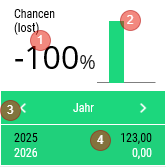
1. Change in %
2. Change graphically
3. Switch display variants "Month" \| "Month / Previous year" \| "Year" \| "KEY DATE" \| "Financial year"
4. <span class="wpaicg-chat-message"></span>
    
     Display of the concrete numbers based on the selection from 3.
 

Available:

- Homepage dashboard
 

Click:

- Switches to the detail view
 

Widget colouring:

- green: fewer lost opportunities in the observation period
- red: more lost opportunities in the observation period
 

The data refers to all lost opportunities assigned to you as responsible or involved Employee.

 </td> </tr> </tbody> </table>

### General

#### Kebab menu ([![image.png](https://en.wiki.dedesales.de/uploads/images/gallery/2026-08/DSOzSi3uEaiMZWCJ-hpximage.png)](https://wiki.dedesales.de/uploads/images/gallery/2025-02/hpximage.png))


<table id="bkmrk-typ-men%C3%BCpunkt-erl%C3%A4ut" style="border-collapse:collapse;width:100%;height:289.969px;"><colgroup><col style="width:5.24434%;"></col><col style="width:31.2214%;"></col><col style="width:63.5343%;"></col></colgroup> <thead> <tr style="height:29.7969px;"> <td style="height:29.7969px;">Type</td> <td style="height:29.7969px;">Menu item</td> <td style="height:29.7969px;">Explanation</td> </tr> </thead> <tbody> <tr style="height:35.7969px;"> <td style="height:35.7969px;">![Only one active entry is possible.](https://en.wiki.dedesales.de/uploads/images/gallery/2026-08/PGlgF4qwhON8QACO-jbemwch2ontcwalv-r6pimage.png)

 </td> <td style="height:35.7969px;">Year</td> <td style="height:35.7969px;">  
</td> </tr> <tr style="height:35.7969px;"> <td style="height:35.7969px;">![Only one active entry is possible.](https://en.wiki.dedesales.de/uploads/images/gallery/2026-08/BfBh1oMZ4P65Jqzs-ghdv6yldau9qro3a-ti5image.png)

 </td> <td style="height:35.7969px;">Financial year</td> <td style="height:35.7969px;">only visible if Financial year &lt;&gt; Year</td> </tr> <tr style="height:35.7969px;"> <td style="height:35.7969px;">![Only one active entry is possible.](https://en.wiki.dedesales.de/uploads/images/gallery/2026-08/8ycOdrgjYaVLgSa2-onzmmy6khifxybqm-5awimage.png)

 </td> <td style="height:35.7969px;">KEY DATE</td> <td style="height:35.7969px;">  
</td> </tr> <tr> <td> </td> <td>------------------------------------    </td> <td>  
</td> </tr> <tr> <td> </td> <td>Export</td> <td>  
</td> </tr> </tbody> </table>

####   


{{DDN-2@282#bkmrk-header}}

#### <span style="font-family:'-apple-system', BlinkMacSystemFont, 'Segoe UI', Oxygen, Ubuntu, Roboto, Cantarell, 'Fira Sans', 'Droid Sans', 'Helvetica Neue', sans-serif;font-size:1.666em;font-weight:400;">Grid</span>

<table id="bkmrk-click-swipe-ansichte" style="border-collapse:collapse;width:100%;"><colgroup><col style="width:33.3731%;"></col><col style="width:33.3731%;"></col><col style="width:33.3731%;"></col></colgroup> <thead> <tr> <td>Click</td> <td>Swipe</td> <td>Views</td> </tr> </thead> <tbody> <tr> <td>  
</td> <td>

1. <div>By swiping you reach the Document view with a preset filter.</div><div>  
    </div>
2. <div>There are 3 swipe selections</div><div>Opportunities &lt;Current year&gt;</div><div>Opportunities &lt;Previous year&gt;  
    Opportunities &lt;Year before last&gt;</div>
 
 </td> <td>

1. Table
 
 </td> </tr> </tbody> </table>

#####   


{{DDN-2@282#bkmrk-filter}}

##### Special feature in the filter for completed opportunities:

The filter can be extended to the Closing code

##### Special feature in the filter for opportunities In progress:

The filter can be extended to the Level

<details id="bkmrk-faq-wie-steuere-ich-"> <summary>FAQ</summary>

 </details><details id="bkmrk-release-ab-version-1"> <summary>Release</summary>

</details>