# Views

# Portrait Mode

In Portrait Mode, the information is displayed in a more compact form.

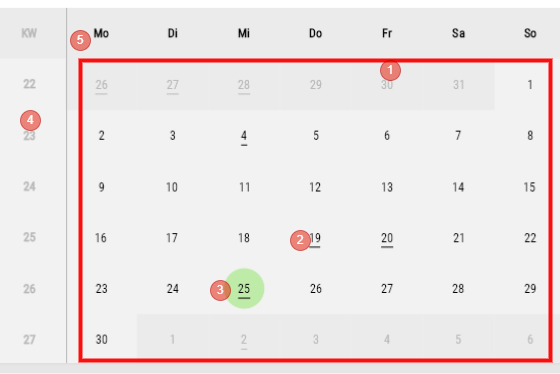
##### Calendar Area

<div drawio-diagram="1850"><img src="https://en.wiki.dedesales.de/uploads/images/gallery/2026-08/SaZzPdTVJlI2mljU-wdcvzqiejgi4vwpl-drawing-9-1750844572.png" alt="wdcvZqIejgI4Vwpl-drawing-9-1750844572.png"/></div>

1. Calendar
2. Days with an underline indicate that at least one Appointment is stored here
3. Current Day
4. Week
5. Days of week
 

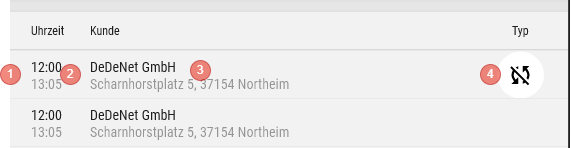
##### List View of Appointments on a Day

<div drawio-diagram="1847"><img src="https://en.wiki.dedesales.de/uploads/images/gallery/2026-08/IsAxM6U63qmBbMo2-otecc28suhqxzryr-drawing-9-1750844279.png" alt="otecC28suhQXzrYR-drawing-9-1750844279.png"/></div>

1. Colour code
2. Time (Start and End)
3. Customer with Street and Location
4. Appointment Type (see here)
 

- Clicking on an Appointment opens the Appointment mask
- Context menu (Swipe or Right-click) 
    - Edit
    - Delete
    - Customer
 

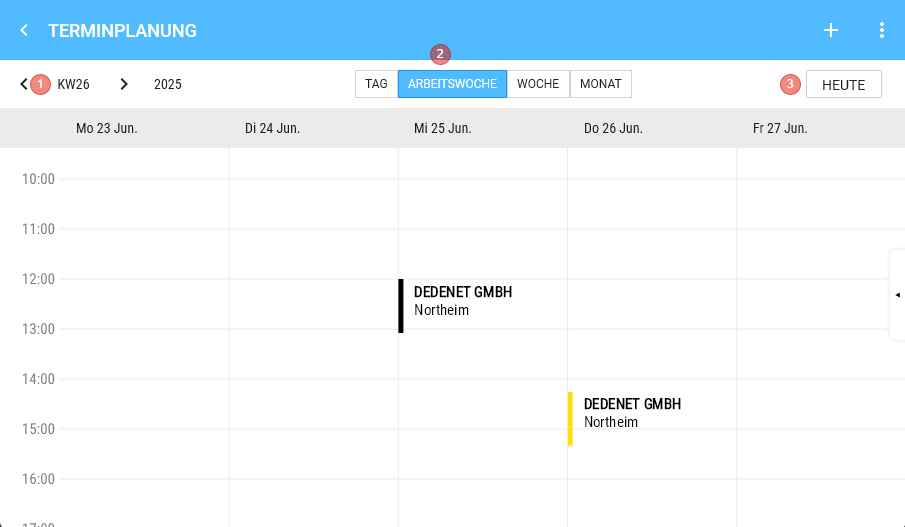
##### Navigation

<div drawio-diagram="1849"><img src="https://en.wiki.dedesales.de/uploads/images/gallery/2026-08/QDJHWrCmKsioOLoZ-xyflids2oubbzyxm-drawing-9-1750844357.png" alt="XyfLiDS2OUBBzyXM-drawing-9-1750844357.png"/></div>

1. Previous Period
2. Next Period
3. Today (jumps to the current Period and selects the current Day)
 

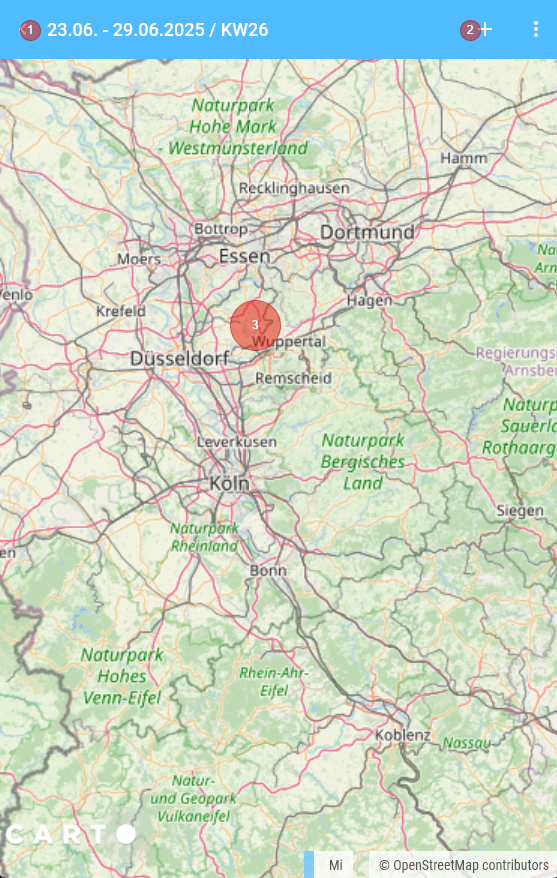
##### Map view

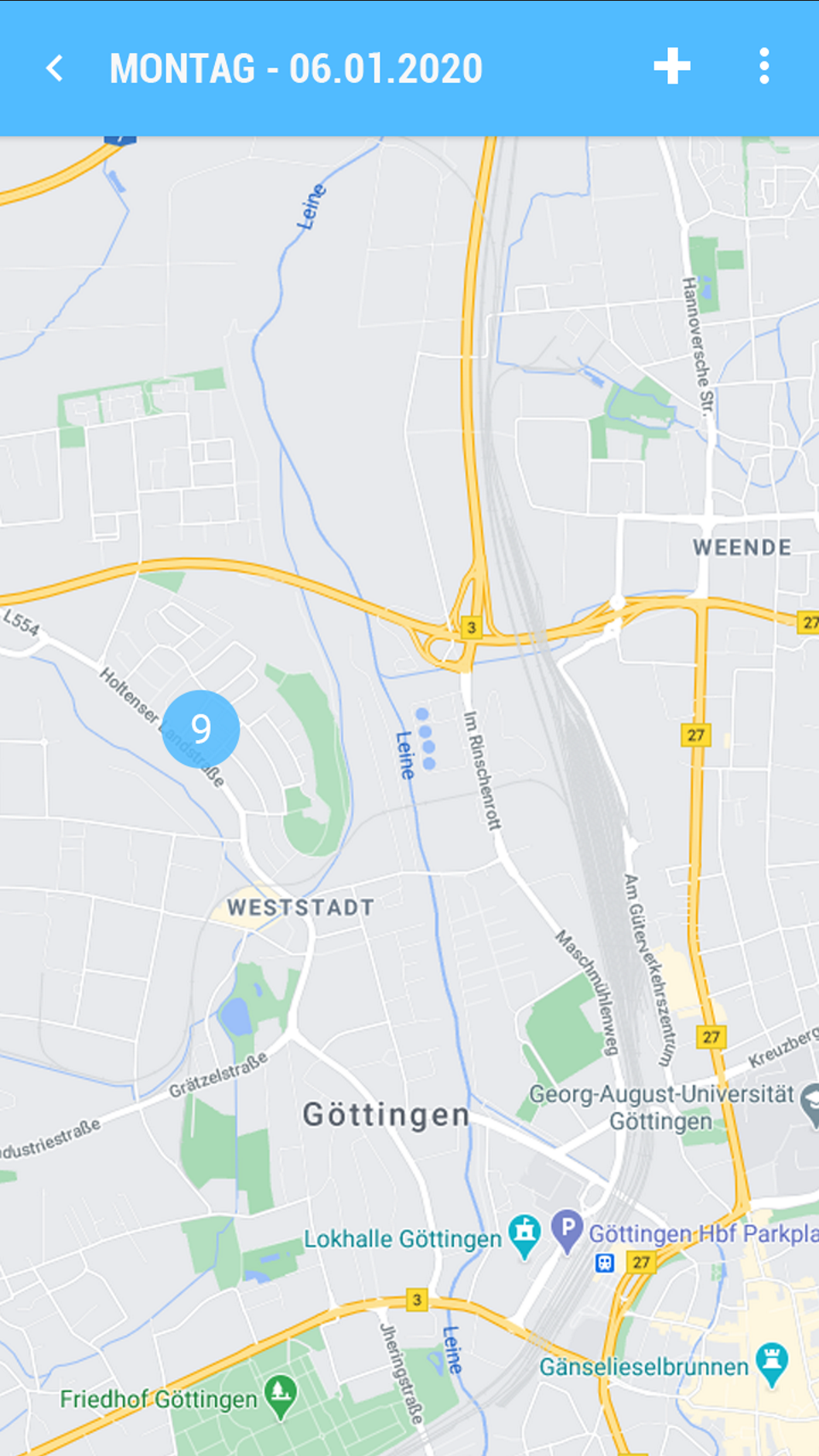
<div drawio-diagram="1853"><img src="https://en.wiki.dedesales.de/uploads/images/gallery/2026-08/N8Az0k2g6PUPCr7K-5ly8furguhwdb6ff-drawing-9-1750845243.png" alt="5ly8fUrgUHwDb6ff-drawing-9-1750845243.png"/></div>

1. Navigation back to View Calendar
2. Add Appointment
3. Map 
    - The map is centred based on the entry for the Employee (only with Tour optimisation licence)
    - Without Tour optimisation licence with entry of the Coordinates in the Role

# Landscape Mode

<div drawio-diagram="1855"><img src="https://en.wiki.dedesales.de/uploads/images/gallery/2026-08/wInPFyqKeY6zeDAz-tz0olqgjjcb9t0bn-drawing-9-1750845603.png" alt="tZ0OlqGJjCB9t0bn-drawing-9-1750845603.png"/></div>

<div id="bkmrk-kalenderwoche-und-ja">

1. Week and Year
2. Toggle functions between the views Day View / Work week / Week / View Month
3. Today - Button 
    - Jumps to the current week of the day bar and selects Today.
 
 </div><div id="bkmrk-i.-kalenderwoche-und"></div>##### Day Bar

<div id="bkmrk-%28nur-sichtbar-bei-ta">(only Visible in Day View / Weekly Overview)[![image.png](https://en.wiki.dedesales.de/uploads/images/gallery/2026-08/4xnrLAuoYIpQlEfA-vtsfkwgbjmk5xpkd-image.png)](https://wiki.dedesales.de/uploads/images/gallery/2025-06/VTsFkWgbJMK5xpKd-image.png)</div><div id="bkmrk-i.-zeigt-die-wochent">Shows the Days of week and Day date and Month (Short form, Jan., Feb.) for each Day in the Week. </div><div id="bkmrk--2"></div><div id="bkmrk--3"></div>##### Day View

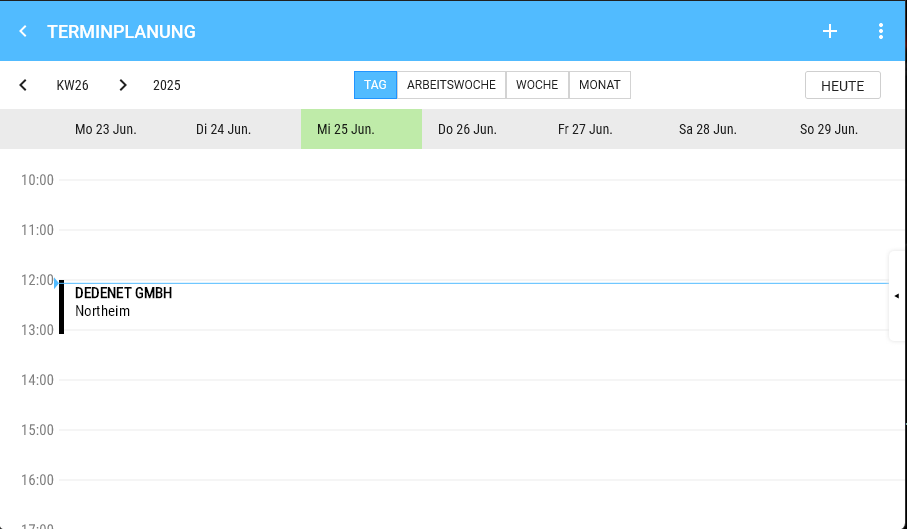
<div id="bkmrk-der-gew%C3%A4hlte-tag-wir">The selected Day is displayed in green.</div>[![image.png](https://en.wiki.dedesales.de/uploads/images/gallery/2026-08/SFk27kD7OCQQ1cUm-1o9aibxgdueawab4-image.png)](https://wiki.dedesales.de/uploads/images/gallery/2025-06/1o9AiBXGdUEAwab4-image.png)

##### Drag &amp; Drop

<div id="bkmrk-i.-longpress-auf-ein">Longpress on an Appointment entry in the View Calendar allows moving the Appointment to another Day or Time.</div><div id="bkmrk-1%29-monatsansicht%3A-ve" style="padding-left:40px;">1) View Month: Moves the Appointment to another Day with the same Time</div><div id="bkmrk-2%29-tages-und-wochena" style="padding-left:40px;">2) Day View and Weekly Overview: Moves the Appointment in 15 Minutes Steps to the desired Time / Day.</div><div id="bkmrk--5"></div><div id="bkmrk--6"></div><div id="bkmrk--7"></div>##### Appointment Details

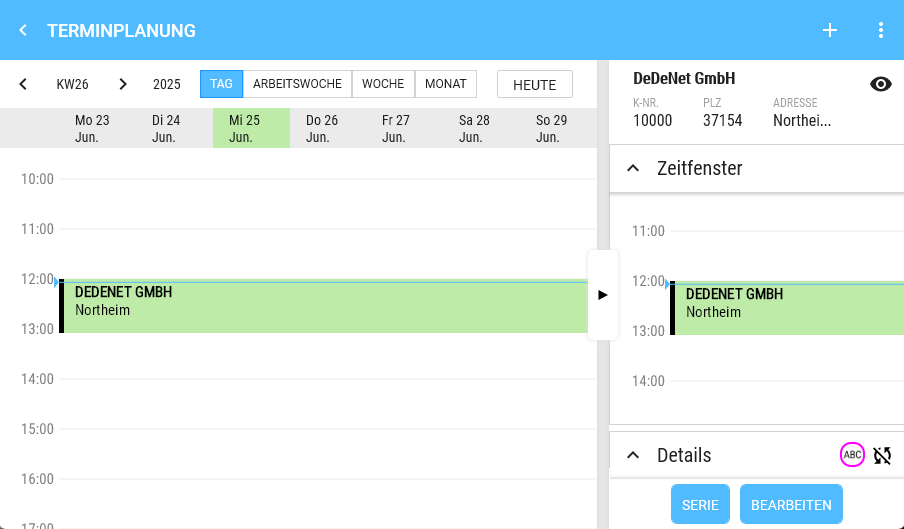
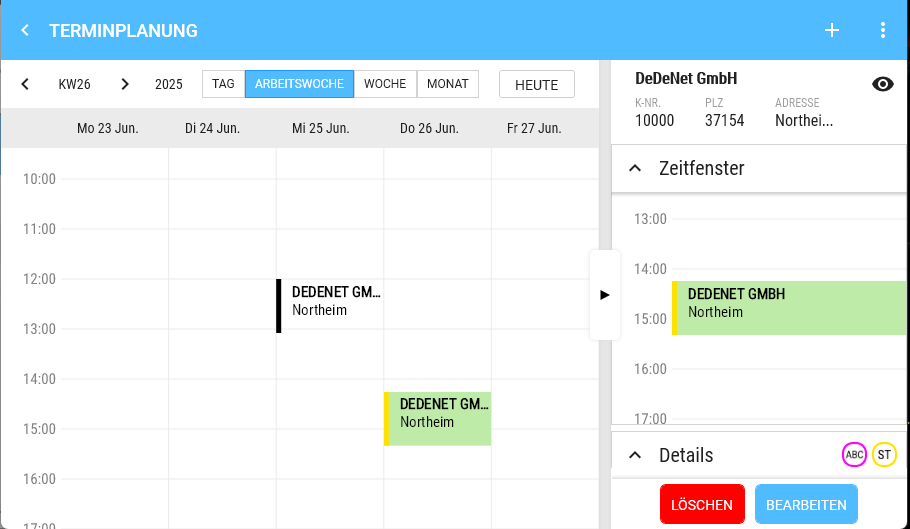
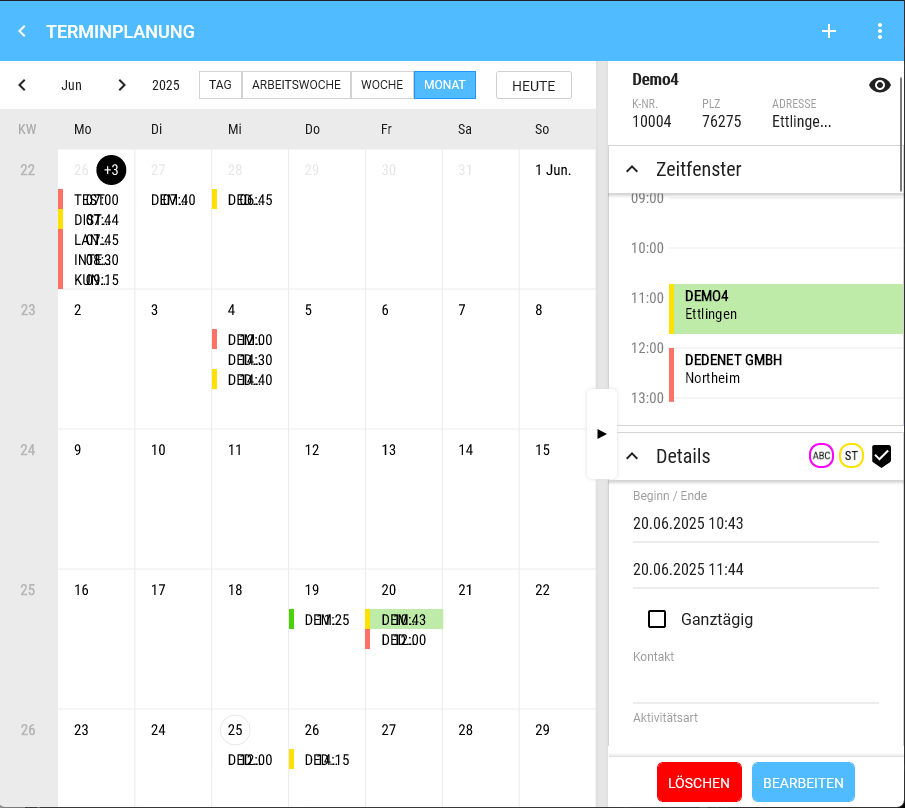
<div id="bkmrk-a.-klickt-man-auf-ei">Clicking on an Appointment opens the right Type via splitter and it can also be Hidden again this way.</div><div id="bkmrk--8"></div>

# Day View / Weekly Overview

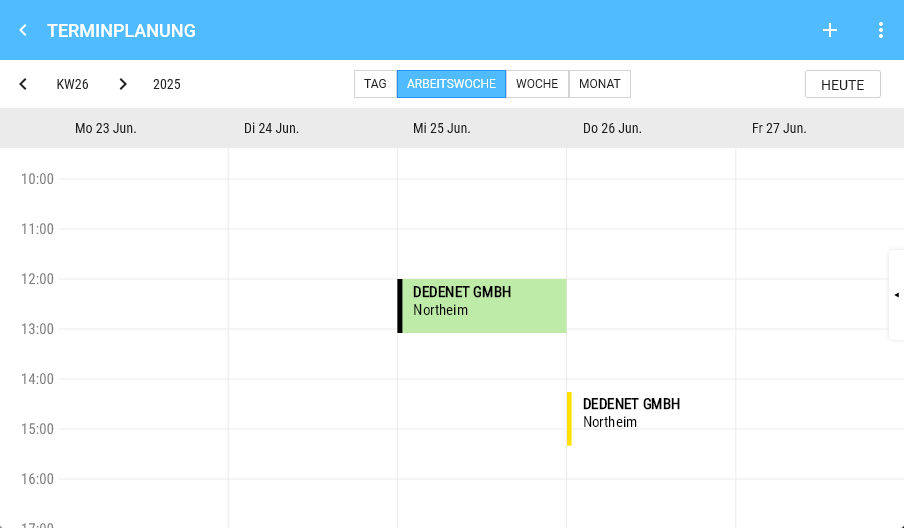
1. 1. Left: Time (hours)
    2. Right: Appointment, if one is selected.
    3. Appointment 
        - Height corresponds to real time
        - Content (Only what fits is displayed; if the appointment height is insufficient, content is simply cut off) 
            - Colour code
            - Customer
            - Location
            - Type 
                - Click: Opens the detail view
                - Multiple appointments at the same time are displayed side by side
    4. Long press  
        - in the calendar on a free time slot creates an appointment. Start time and Date are pre-set.
        - The slot size for the Start time is 30 Minutes.
    5. If the current day is Visible, the current Time is shown by a horizontal line.
 
<table id="bkmrk-tagesansicht-termind" style="border-collapse:collapse;width:100%;"><colgroup><col style="width:50%;"></col><col style="width:50%;"></col></colgroup> <tbody> <tr> <td>Day View</td> <td>Appointment details

 </td> </tr> <tr> <td>[![image.png](https://en.wiki.dedesales.de/uploads/images/gallery/2026-08/4akaVjjRhU3oosr2-4aqggpwiwybur9nf-image.png)](https://wiki.dedesales.de/uploads/images/gallery/2025-06/4aqGgPwIwybUR9NF-image.png)

 </td> <td>[![image.png](https://en.wiki.dedesales.de/uploads/images/gallery/2026-08/LRlM6olyk6ybyc9l-mdeopuugjdxz4irr-image.png)](https://wiki.dedesales.de/uploads/images/gallery/2025-06/MDeOPuuGJDXz4irr-image.png)

 </td> </tr> <tr> <td>Weekly Overview</td> <td>Appointment details</td> </tr> <tr> <td>[![image.png](https://en.wiki.dedesales.de/uploads/images/gallery/2026-08/FpAvanjtrrWH56PC-dthycfqe30hguwq6-image.png)](https://wiki.dedesales.de/uploads/images/gallery/2025-06/dtHycFQE30HGUwq6-image.png)

 </td> <td>[![image.png](https://en.wiki.dedesales.de/uploads/images/gallery/2026-08/I2euzlR78rSyAwQr-8fteglm2erzfxfx7-image.png)](https://wiki.dedesales.de/uploads/images/gallery/2025-06/8FtegLM2ErZFXfX7-image.png)

 </td> </tr> </tbody></table>

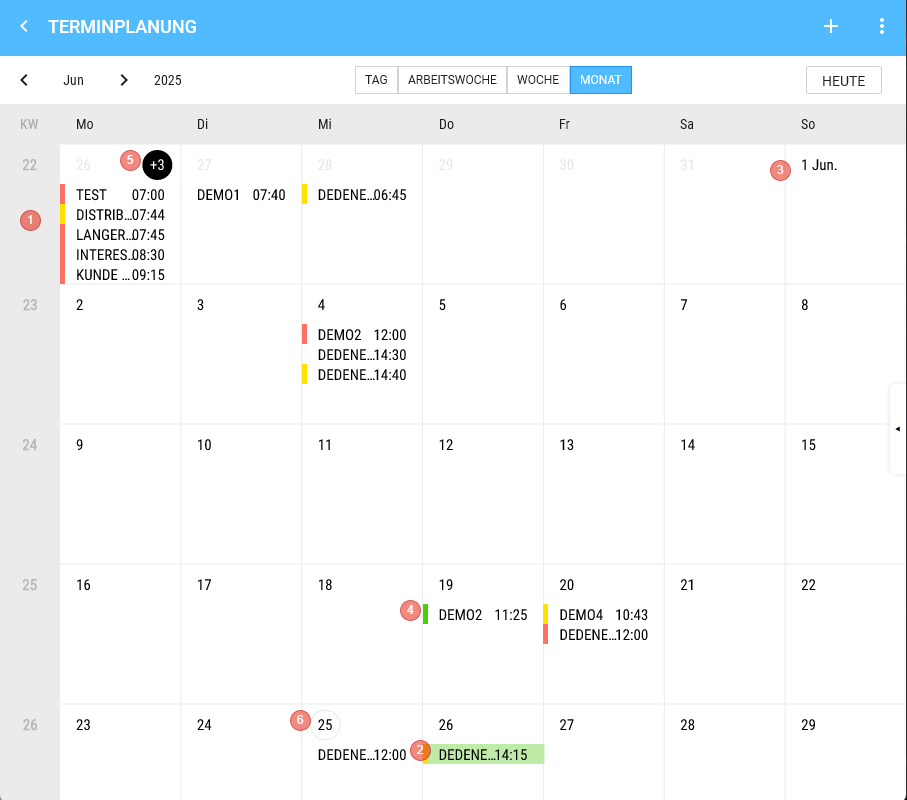
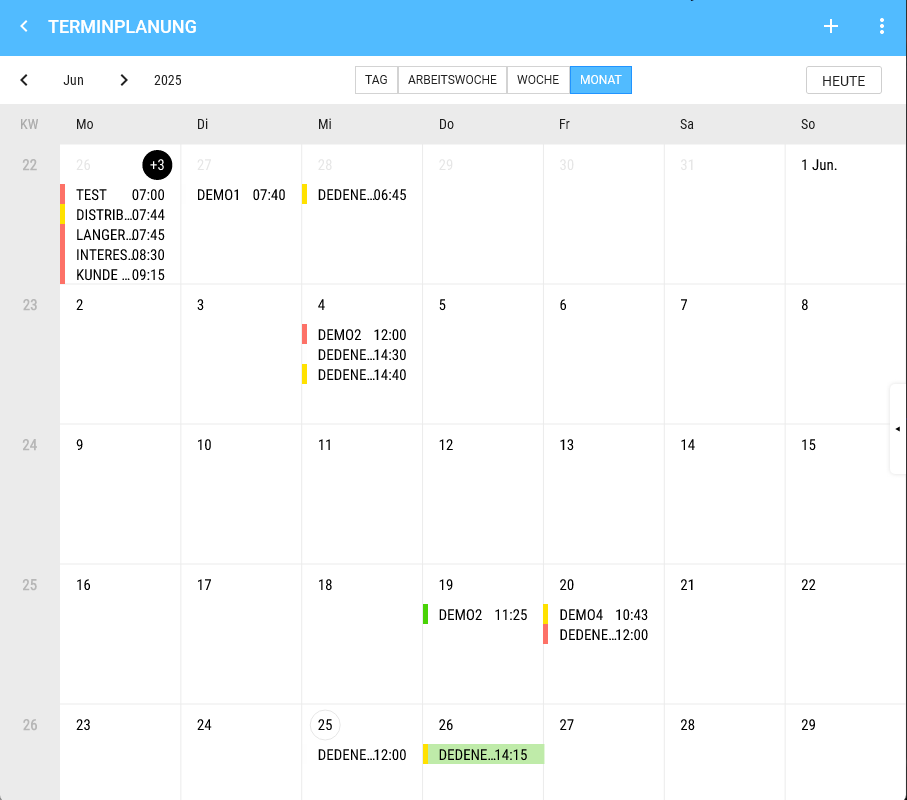
# View Month

<div drawio-diagram="1866"><img src="https://en.wiki.dedesales.de/uploads/images/gallery/2026-08/M9wM04aguDup8Cw2-pzuuvsbbst00dbaw-drawing-9-1750847679.png" alt="pzuuVsbbST00DbAw-drawing-9-1750847679.png"/></div>

1. Weeks
2. Appointment, if one is selected.
3. The calendar can be scrolled vertically (endless) 
    - We show 4 Weeks + remainder.
    - On the 1st of a Month, we always add the Month (abbreviated).
4. Appointment 
    - Height is fixed (there is space for 5 appointments stacked)
    - Content 
        - 1) Colour code
        - 2) Customer
        - 3) Time
    - Click shows the appointment details on the Right.
5. Day 
    - Day title 
        - 1) If more appointments exist on that Day than can be displayed, the number of non-visible appointments is shown in the day title (e.g. "+2") 
            - a) Clicking on the "+2" switches to the Day View.
        - 2) Double-click switches to the Day View of the corresponding Day.
6. The current Day is shown with a grey border. 
    - Appointments are displayed top-down
    - Longpress 
        - Creates an appointment on that Day
 
<table id="bkmrk-klick-auf-das-auge-%C3%B6" style="border-collapse:collapse;width:100%;"><colgroup><col style="width:50%;"></col><col style="width:50%;"></col></colgroup> <tbody> <tr> <td>[![image.png](https://en.wiki.dedesales.de/uploads/images/gallery/2026-08/rPz1CtmK1UQqByFl-3fzdtg2jvw2d1wmx-image.png)](https://wiki.dedesales.de/uploads/images/gallery/2025-06/3FzDTg2JvW2d1WMX-image.png)

 </td> <td>[![image.png](https://en.wiki.dedesales.de/uploads/images/gallery/2026-08/oL8MsLe3xTeuyt28-keszcaecmfrgfwoy-image.png)](https://wiki.dedesales.de/uploads/images/gallery/2025-06/KESZCaecMFrGFWOy-image.png)

 </td> </tr> <tr> <td>View Month</td> <td>Click on the eye opens the Customer masterdata.  
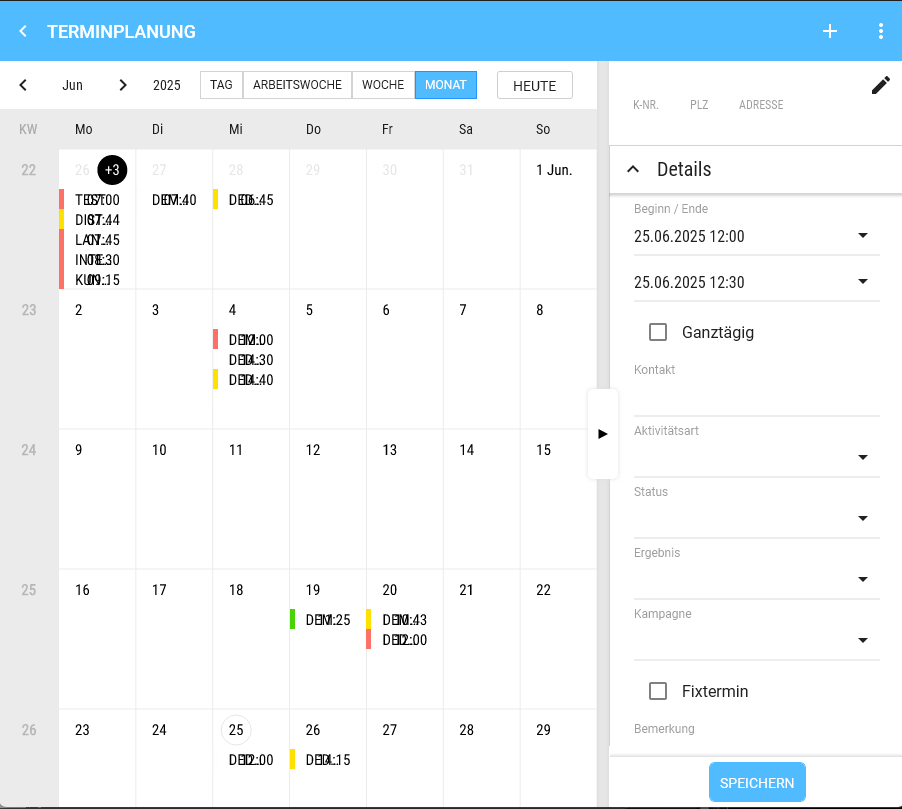
</td> </tr> <tr> <td>[![image.png](https://en.wiki.dedesales.de/uploads/images/gallery/2026-08/EYt8Fx9xAlVPbibR-0do0qtsoppjuh3fp-image.png)](https://wiki.dedesales.de/uploads/images/gallery/2025-06/0Do0QTSopPJUh3fP-image.png)

 </td> <td>  
</td> </tr> <tr> <td>Click on the pencil changes the Customer.

 </td> <td>  
</td> </tr> </tbody></table>

# Map (Landscape Mode)

<div id="bkmrk-in-der-landscape-sic">In Landscape view (except in View Month, where the map makes no sense) you can activate the map.</div><div id="bkmrk-man-springt-dann-in-">You then jump to the identical period in the Map view. </div><div id="bkmrk-%C3%96ffnet-man-die-karte">If you open the Map view without customers, the area of the Home address is displayed, provided the Tour optimisation is licensed. Otherwise, the Coordinates from the Role are shown. If these are also empty, the map centres on Göttingen / Kassel.</div><div id="bkmrk-die-kartensicht-enth">The Map view contains the following elements:</div><div id="bkmrk-">  
</div>### Header

<div drawio-diagram="1870"><img src="https://en.wiki.dedesales.de/uploads/images/gallery/2026-08/3qlIuG78aTuKvNjK-ex9fjbvicgnztswv-drawing-9-1750848383.png" alt="EX9FJBvIcgNzTswV-drawing-9-1750848383.png"/></div>

<div id="bkmrk-a.-titel">

1. Title: Current display period + calendar week
2. Back arrow to switch back to the time view
3. Plus (activates the radius selection)
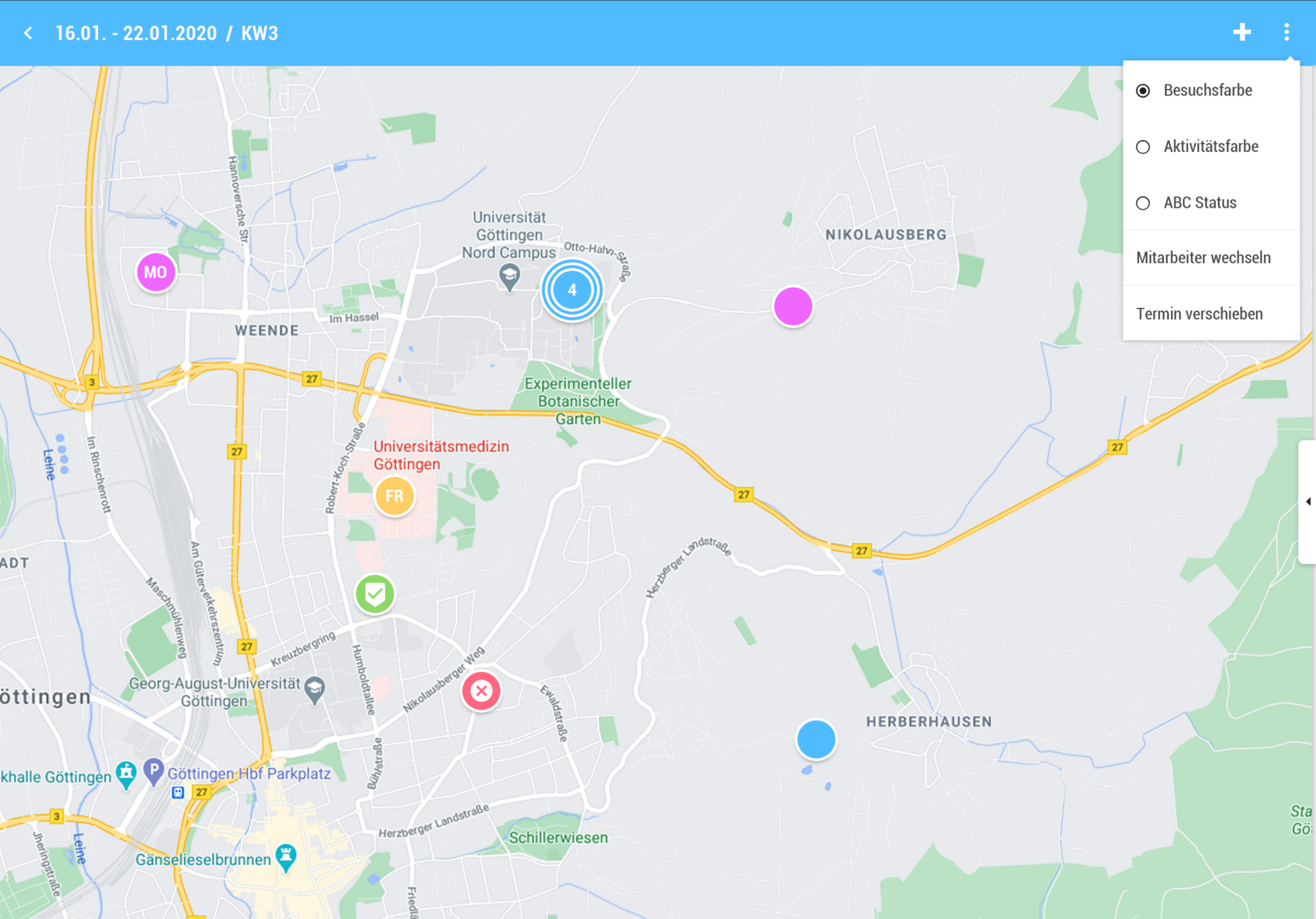
4. Triple Point 
    - "Map" and "List" are not visible
    - Customers (toggles the grid on/off)
    - Customer names 
        - (Toggle, displays "Name1 Name2 Name3" under the PINs)
 
 </div><div id="bkmrk--3">  
</div>### Display

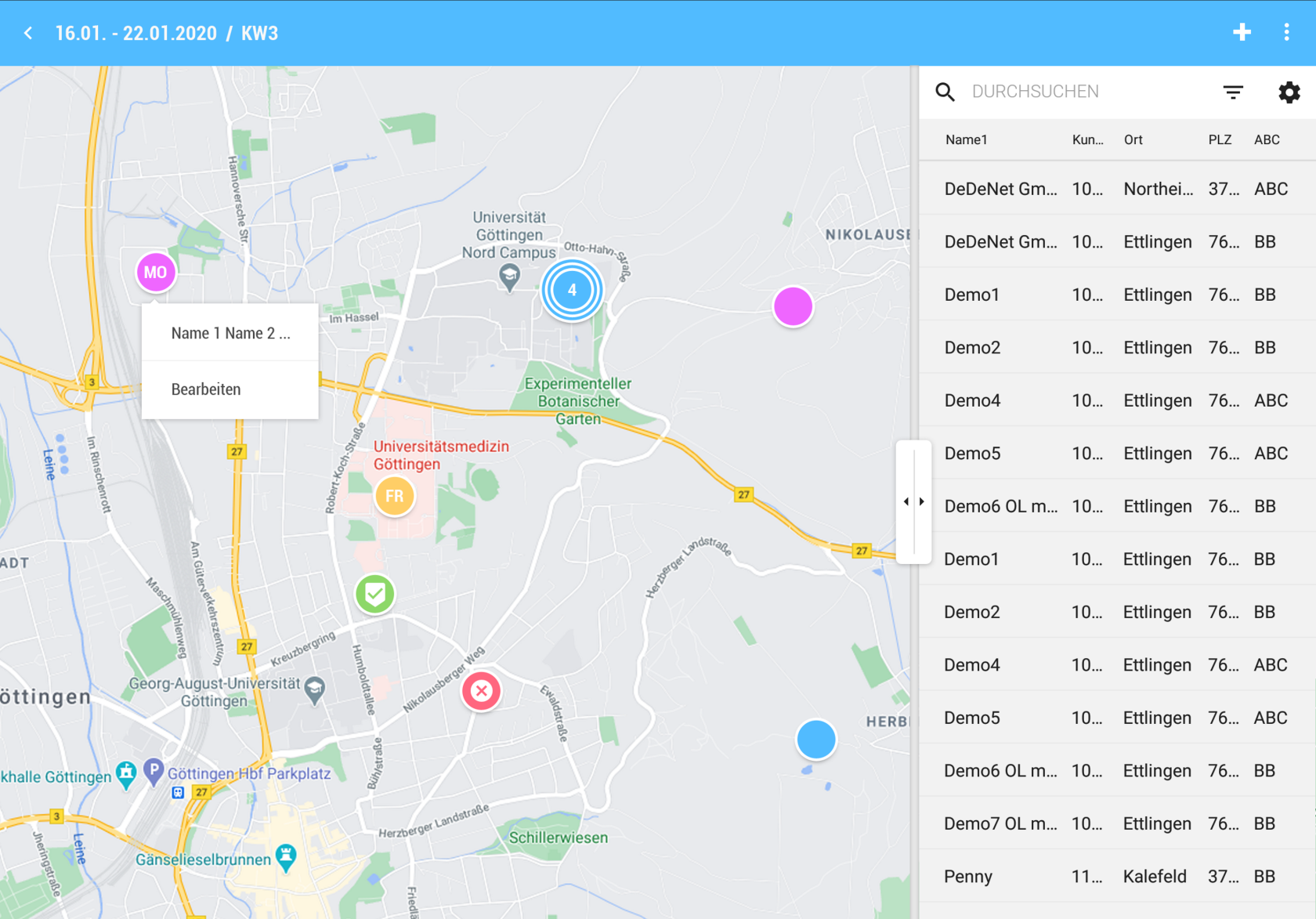
[![image.png](https://en.wiki.dedesales.de/uploads/images/gallery/2026-08/boF9qL8pFipz8N1D-jzlh9rcoxhdx1nre-image.png)](https://wiki.dedesales.de/uploads/images/gallery/2025-06/JZLh9RcoXHDX1NrE-image.png)

<div id="bkmrk-a.-karte-%282%2F3%29">Map (2/3)</div>

- All Appointments in the selected period are displayed.
- Customers from the Result list are displayed in the grid. 
    - 1) Deleted customers are not shown on the map.
    - 2) Pin (circle) 
        - a) For more than 1,000 customers to display, the Customer name is not shown on the map.
    - 3) Click on Pin 
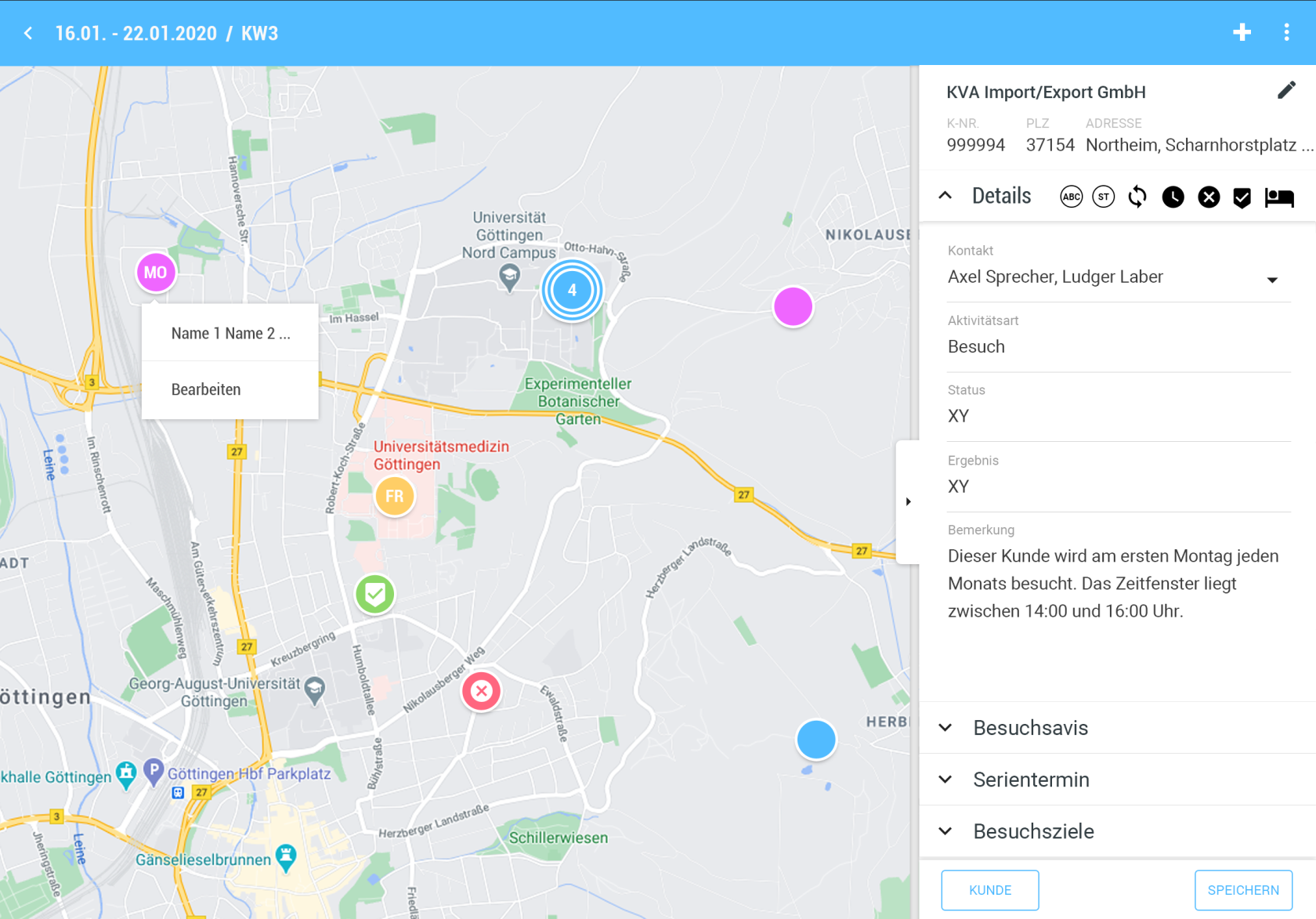
        - a) If an Appointment exists: Opens the Appointment view on the right and hides the grid if visible.
        - b) If no Appointment exists: Like +, the selected Customer is already preselected.
    - 4) The Colour of PIN is defined by the corresponding setting in the Triple Point menu. 
        - a) Darker shades should be chosen so that the font colour does not clash with the Colour of PIN.
    - 5) If the PIN is already scheduled in the Appointment calendar 
        - a) Weekly Overview: Shows the Day of week abbreviated (MO, TU, WE, FR, SA, SU).
        - b) Day View: Shows the order according to Calendar management (1st, 2nd, 3rd, … ).
        - c) If the Appointment is Done or cancelled, the corresponding symbols are shown instead of the described abbreviations.
    - 6) For route drawing, there is a separate route colour for each Day of week.
 
<div id="bkmrk-iii.-pin-cluster">

- Pin Cluster 
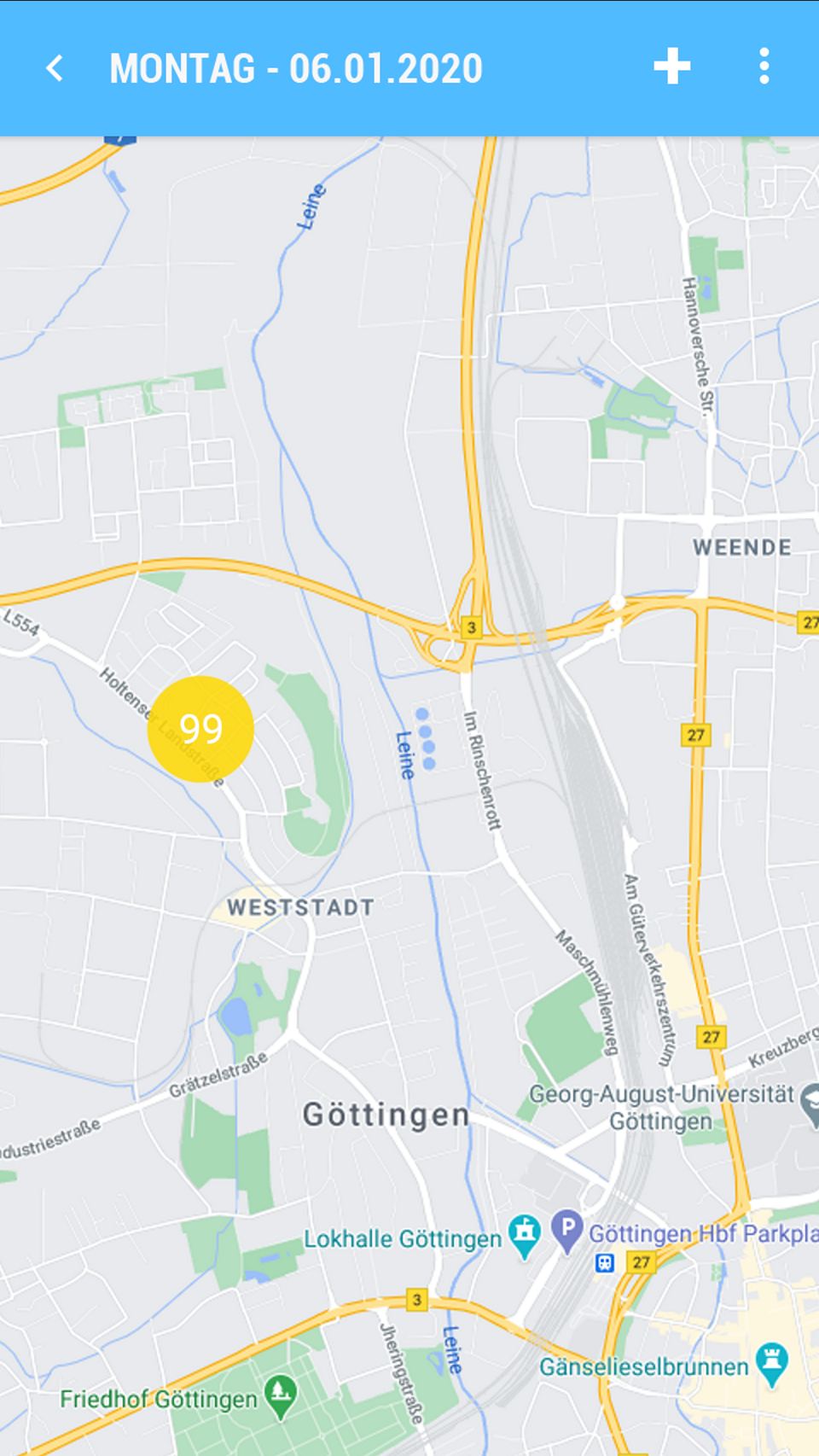
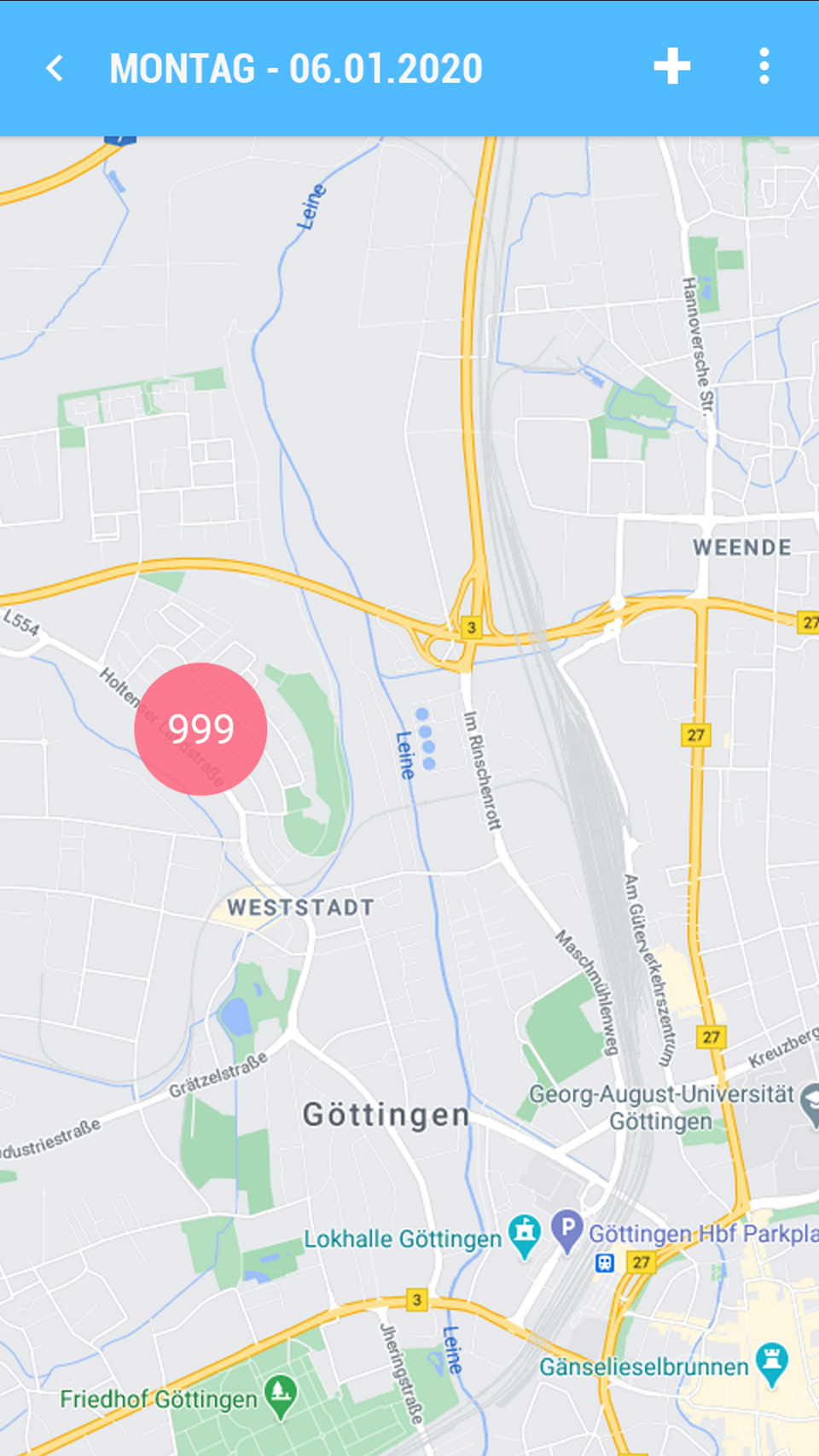
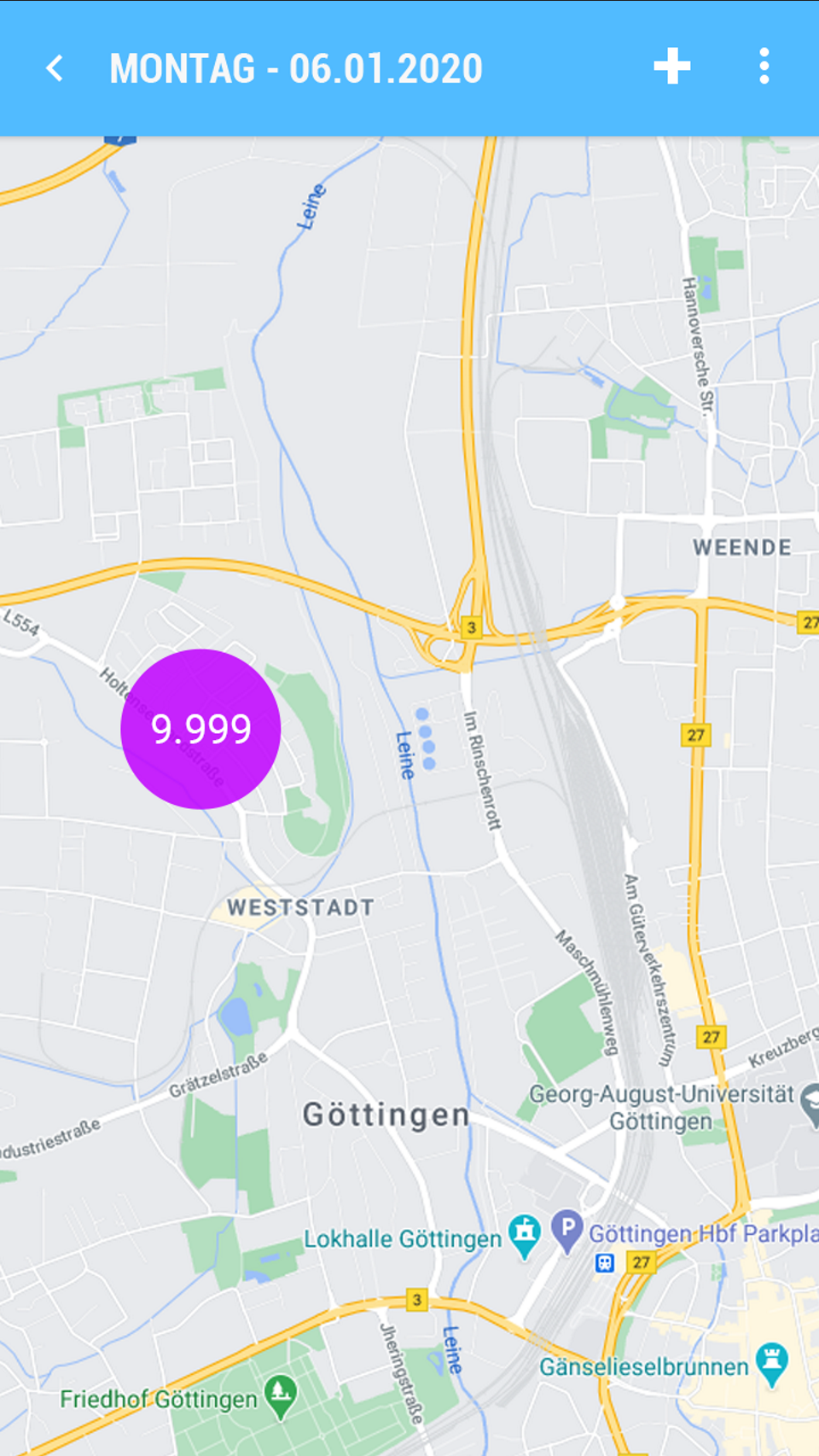
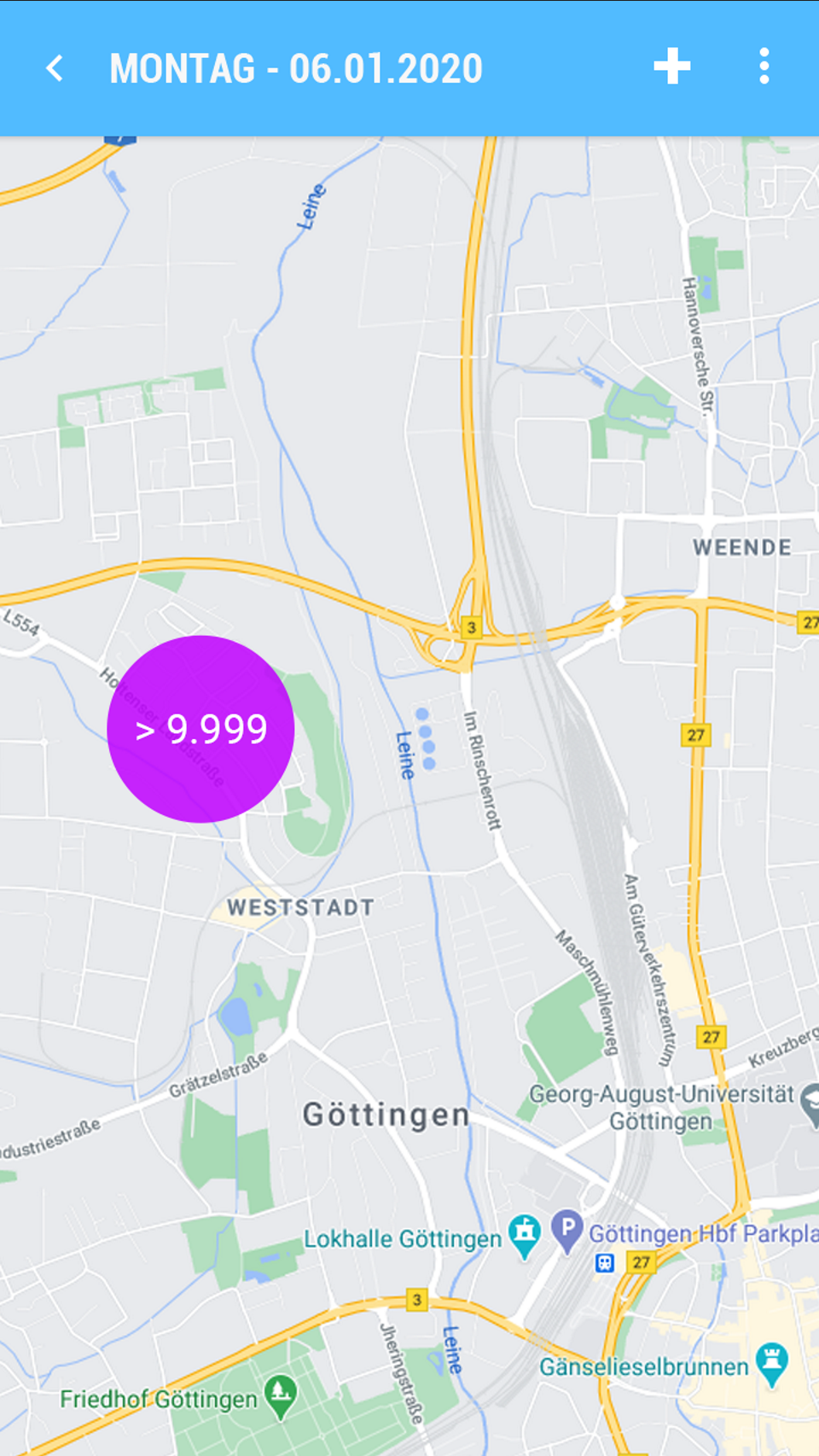
    - 1) Contains the Quantity of Pins included. Colour and Size of the cluster change depending on the Quantity of Pins as follows: 
        - a) 9 (Colour = Blue)
        - b) 99 (Colour = Yellow)
        - c) 999 (Colour = Red)
        - d) 9,999 (Colour = Purple)
        - e) &gt; 9,999 (Colour = Purple)
    - 2) Clicking on a cluster zooms in two levels further. 
        - a) If at the lowest zoom level a cluster is still required, a cluster pin is still shown. Clicking on the pin opens a popup with all Customers contained. Selecting an entry then opens the Promotion for the PIN.
        - b) Grid 
            - Name1
            - Name2 (Visible only in Landscape)
            - Name3 (Visible only in Landscape)
            - Street
            - Postal code (half width)
            - Location
 
 </div><div id="bkmrk-b.-grid-kundensuche-">Grid Customer Search (1/3)</div><div id="bkmrk-click-auf-einen-kund">Clicking on a Customer zooms the position on the map</div><div id="bkmrk--6"></div><div id="bkmrk-contextmen%C3%BC-%C2%A0tripple"><table style="border-collapse:collapse;width:101.429%;height:648px;"> <tbody> <tr style="height:29.7969px;"> <td style="height:29.7969px;width:50.001%;">Context menu</td> <td style="height:29.7969px;width:50.001%;"> Triple Point</td> </tr> <tr style="height:300.422px;"> <td style="height:300.422px;width:50.001%;">[![image.png](https://en.wiki.dedesales.de/uploads/images/gallery/2026-08/eRUUFvLmH47AU6bt-abvfz1ji5hgfcsph-image.png)](https://wiki.dedesales.de/uploads/images/gallery/2025-06/AbVfz1Ji5HGFCsPh-image.png)

 </td> <td style="height:300.422px;width:50.001%;">[![image.png](https://en.wiki.dedesales.de/uploads/images/gallery/2026-08/2RPN3DU9z04lvwER-ucr1g14phodejwfb-image.png)](https://wiki.dedesales.de/uploads/images/gallery/2025-06/uCr1G14PhODeJwfb-image.png)

 </td> </tr> <tr style="height:29.7969px;"> <td style="height:29.7969px;width:50.001%;">Edit Appointment</td> <td style="height:29.7969px;width:50.001%;"> </td> </tr> <tr> <td style="width:50.001%;">[![image.png](https://en.wiki.dedesales.de/uploads/images/gallery/2026-08/FZe8UIMWaoT6CE2D-veg245zfvv2vxcvr-image.png)](https://wiki.dedesales.de/uploads/images/gallery/2025-06/veG245zFvv2VXcvR-image.png)</td> <td style="width:50.001%;"> </td> </tr> </tbody> </table>

 </div><table id="bkmrk-beispiel-cluster-pin" style="border-collapse:collapse;width:100%;height:29.7969px;"><colgroup><col style="width:20%;"></col><col style="width:20%;"></col><col style="width:20%;"></col><col style="width:20%;"></col><col style="width:20%;"></col></colgroup> <tbody> <tr> <td>Example Cluster Pin</td> <td>  
</td> <td>  
</td> <td>  
</td> <td> </td> </tr> <tr style="height:29.7969px;"> <td style="height:29.7969px;">[![image.png](https://en.wiki.dedesales.de/uploads/images/gallery/2026-08/fz86XD1xruoSVQpc-jfxcycu2tzfistby-image.png)](https://wiki.dedesales.de/uploads/images/gallery/2025-06/JfxCYcU2TZFiSTby-image.png)</td> <td style="height:29.7969px;">[![image.png](https://en.wiki.dedesales.de/uploads/images/gallery/2026-08/paWstnVXqz6aH5xB-nvsosrpkm6llfnwa-image.png)](https://wiki.dedesales.de/uploads/images/gallery/2025-06/NvsoSrPkm6llfnWa-image.png)</td> <td style="height:29.7969px;">[![image.png](https://en.wiki.dedesales.de/uploads/images/gallery/2026-08/5yOMcNWBTc1KoHok-ctycm388qouo4ziu-image.png)](https://wiki.dedesales.de/uploads/images/gallery/2025-06/CtYcm388QouO4Ziu-image.png)</td> <td style="height:29.7969px;">[![image.png](https://en.wiki.dedesales.de/uploads/images/gallery/2026-08/quSELDSdSEeyrRAO-ggkjsidkx2tcplkk-image.png)](https://wiki.dedesales.de/uploads/images/gallery/2025-06/GGkJsidkx2tCpLkK-image.png)</td> <td style="height:29.7969px;">[![image.png](https://en.wiki.dedesales.de/uploads/images/gallery/2026-08/ImVlXw30qxdbVGJO-zo9pv95tl2ebxm65-image.png)](https://wiki.dedesales.de/uploads/images/gallery/2025-06/zo9Pv95TL2EBXm65-image.png)

 </td> </tr> </tbody> </table>

<div id="bkmrk-contextmen%C3%BC-%C2%A0"></div>

# List

<table id="bkmrk-titel-verf%C3%BCgbar-widg" style="border-collapse:collapse;width:112.381%;height:59.5938px;border-width:1px;"><colgroup><col style="width:100%;"></col></colgroup> <thead> <tr style="height:29.7969px;"> <td style="height:29.7969px;">Title</td> </tr> </thead> <tbody> <tr style="height:29.7969px;"> <td style="height:29.7969px;">#### Appointment list

Current display period for Day/Week/Work week. In the View Month, the period always also includes the previous and following month.

Available

- Customer details 
    - only appointments for the selected customer and period are displayed
- Homepage dashboard 
    - all customers with appointments in the currently selected period are displayed
 
 </td> </tr> </tbody> </table>

### General

#### Kebab menu ([![image.png](https://en.wiki.dedesales.de/uploads/images/gallery/2026-08/DSOzSi3uEaiMZWCJ-hpximage.png)](https://wiki.dedesales.de/uploads/images/gallery/2025-02/hpximage.png))


<table id="bkmrk-typ-men%C3%BCpunkt-erl%C3%A4ut" style="border-collapse:collapse;width:100%;height:289.969px;"><colgroup><col style="width:5.24434%;"></col><col style="width:31.2214%;"></col><col style="width:63.5343%;"></col></colgroup> <thead> <tr style="height:29.7969px;"> <td style="height:29.7969px;">Type</td> <td style="height:29.7969px;">Menu item</td> <td style="height:29.7969px;">Explanation</td> </tr> </thead> <tbody> <tr style="height:29.7969px;"> <td style="height:29.7969px;"> </td> <td style="height:29.7969px;">  
</td> <td style="height:29.7969px;">"Map" and "List" are not visible</td> </tr> <tr style="height:63.3906px;"> <td style="height:63.3906px;"> </td> <td style="height:63.3906px;">Delete   
</td> <td style="height:63.3906px;">Deletes the selected entries. In the case of a serial appointment, only this serial appointment is deleted. No confirmation is requested.</td> </tr> </tbody> </table>


##### Column definition

<table id="bkmrk-bezeichnung-sichtbar" style="border-collapse:collapse;width:100%;height:2019.17px;"><colgroup><col style="width:28.7247%;"></col><col style="width:14.6603%;"></col><col style="width:11.4401%;"></col><col style="width:7.86864%;"></col><col style="width:37.4255%;"></col></colgroup> <thead> <tr style="height:29.7969px;"> <td style="height:29.7969px;">Name</td> <td style="height:29.7969px;">Visible</td> <td style="height:29.7969px;">Sort</td> <td style="height:29.7969px;">Full Text</td> <td style="height:29.7969px;">Explanation</td> </tr> </thead> <tbody> <tr style="height:29.7969px;"> <td style="height:29.7969px;">Colour code</td> <td style="height:29.7969px;">ForceVisible</td> <td style="height:29.7969px;">  
</td> <td style="height:29.7969px;">  
</td> <td style="height:29.7969px;">The colour code corresponds to the current selection of the colour display in the calendar management.</td> </tr> <tr style="height:29.7969px;"> <td style="height:29.7969px;">Name 1</td> <td style="height:29.7969px;">Visible</td> <td style="height:29.7969px;">  
</td> <td style="height:29.7969px;">Yes</td> <td style="height:29.7969px;">  
</td> </tr> <tr style="height:29.7969px;"> <td style="height:29.7969px;">Name 2

 </td> <td style="height:29.7969px;">Hidden</td> <td style="height:29.7969px;">  
</td> <td style="height:29.7969px;">Yes</td> <td style="height:29.7969px;">  
</td> </tr> <tr style="height:29.7969px;"> <td style="height:29.7969px;">Name 3</td> <td style="height:29.7969px;">Hidden</td> <td style="height:29.7969px;">  
</td> <td style="height:29.7969px;">Yes</td> <td style="height:29.7969px;">  
</td> </tr> <tr style="height:29.7969px;"> <td style="height:29.7969px;">Customer</td> <td style="height:29.7969px;">VisibleOnlyLandscape</td> <td style="height:29.7969px;">  
</td> <td style="height:29.7969px;">Yes</td> <td style="height:29.7969px;">  
</td> </tr> <tr style="height:29.7969px;"> <td style="height:29.7969px;">Street</td> <td style="height:29.7969px;">VisibleOnlyLandscape</td> <td style="height:29.7969px;">  
</td> <td style="height:29.7969px;">Yes</td> <td style="height:29.7969px;">  
</td> </tr> <tr style="height:29.7969px;"> <td style="height:29.7969px;">Postcode</td> <td style="height:29.7969px;">VisibleOnlyLandscape</td> <td style="height:29.7969px;">  
</td> <td style="height:29.7969px;">Yes</td> <td style="height:29.7969px;">  
</td> </tr> <tr style="height:29.7969px;"> <td style="height:29.7969px;">Place</td> <td style="height:29.7969px;">Visible</td> <td style="height:29.7969px;">  
</td> <td style="height:29.7969px;">Yes</td> <td style="height:29.7969px;">  
</td> </tr> <tr style="height:29.7969px;"> <td style="height:29.7969px;">Appointment start</td> <td style="height:29.7969px;">Visible</td> <td style="height:29.7969px;">ASC</td> <td style="height:29.7969px;">  
</td> <td style="height:29.7969px;">dd.mm.yyyy hh:mm  
</td> </tr> <tr style="height:29.7969px;"> <td style="height:29.7969px;">Appointment end</td> <td style="height:29.7969px;">Visible</td> <td style="height:29.7969px;">  
</td> <td style="height:29.7969px;">  
</td> <td style="height:29.7969px;">dd.mm.yyyy hh:mm  
</td> </tr> <tr style="height:29.7969px;"> <td style="height:29.7969px;">Type of activity</td> <td style="height:29.7969px;">Hidden</td> <td style="height:29.7969px;">  
</td> <td style="height:29.7969px;">  
</td> </tr> <tr style="height:29.7969px;"> <td style="height:29.7969px;">Appointment status</td> <td style="height:29.7969px;">Hidden</td> <td style="height:29.7969px;">  
</td> <td style="height:29.7969px;">  
</td> </tr> <tr style="height:29.7969px;"> <td style="height:29.7969px;">Result</td> <td style="height:29.7969px;">Hidden</td> <td style="height:29.7969px;">  
</td> <td style="height:29.7969px;">  
</td> </tr> <tr style="height:29.7969px;"> <td style="height:29.7969px;">Fixed appointment</td> <td style="height:29.7969px;">Hidden</td> <td style="height:29.7969px;">  
</td> <td style="height:29.7969px;">  
</td> </tr> <tr style="height:29.7969px;"> <td style="height:29.7969px;">Created by</td> <td style="height:29.7969px;">Hidden</td> <td style="height:29.7969px;">  
</td> <td style="height:29.7969px;">  
</td> </tr> <tr style="height:29.7969px;"> <td style="height:29.7969px;">Created for  
</td> <td style="height:29.7969px;">Hidden</td> <td style="height:29.7969px;">  
</td> <td style="height:29.7969px;">  
</td> </tr> <tr style="height:29.7969px;"> <td style="height:29.7969px;">ABC status  
</td> <td style="height:29.7969px;">Hidden</td> <td style="height:29.7969px;">  
</td> <td style="height:29.7969px;">  
</td> </tr> <tr style="height:29.7969px;"> <td style="height:29.7969px;">Country</td> <td style="height:29.7969px;">Hidden</td> <td style="height:29.7969px;">  
</td> <td style="height:29.7969px;">  
</td> </tr> <tr style="height:29.7969px;"> <td style="height:29.7969px;">Telephone number</td> <td style="height:29.7969px;">Hidden</td> <td style="height:29.7969px;">  
</td> <td style="height:29.7969px;">  
</td> </tr> <tr style="height:29.7969px;"> <td style="height:29.7969px;">Fax number</td> <td style="height:29.7969px;">Hidden</td> <td style="height:29.7969px;">  
</td> <td style="height:29.7969px;">  
</td> </tr> <tr style="height:29.7969px;"> <td style="height:29.7969px;">E-mail

 </td> <td style="height:29.7969px;">Hidden</td> <td style="height:29.7969px;">  
</td> <td style="height:29.7969px;">  
</td> </tr> <tr style="height:29.7969px;"> <td style="height:29.7969px;">Sales office

 </td> <td style="height:29.7969px;">Hidden</td> <td style="height:29.7969px;">  
</td> <td style="height:29.7969px;">  
</td> </tr> <tr style="height:29.7969px;"> <td style="height:29.7969px;">Price list

 </td> <td style="height:29.7969px;">Hidden</td> <td style="height:29.7969px;">  
</td> <td style="height:29.7969px;">  
</td> </tr> <tr style="height:29.7969px;"> <td style="height:29.7969px;">Last visit

 </td> <td style="height:29.7969px;">Hidden</td> <td style="height:29.7969px;">  
</td> <td style="height:29.7969px;">  
</td> </tr> <tr style="height:29.7969px;"> <td style="height:29.7969px;">Visiting frequency

 </td> <td style="height:29.7969px;">Hidden</td> <td style="height:29.7969px;">  
</td> <td style="height:29.7969px;">  
</td> </tr> <tr style="height:231.359px;"> <td style="height:231.359px;">Due date (from version 10)

 </td> <td style="height:231.359px;">Hidden</td> <td style="height:231.359px;">  
</td> <td style="height:231.359px;">  
</td> <td style="height:231.359px;">The text for this column is determined as follows:  
no BR: no visiting frequency present in the customer master data  
no visit: no last visit present  
not due: Last visit + Visiting frequency &gt; current calendar week  
Now: Last visit + Visiting frequency == current calendar week  
Overdue (1): Last visit + Visiting frequency &lt; current calendar week  
Overdue (2): Last visit + (Visiting frequency \* 2) &lt;= current calendar week  
</td> </tr> <tr style="height:29.7969px;"> <td style="height:29.7969px;">Visit duration

 </td> <td style="height:29.7969px;">Hidden</td> <td style="height:29.7969px;">  
</td> <td style="height:29.7969px;">  
</td> </tr> <tr style="height:29.7969px;"> <td style="height:29.7969px;">Tour

 </td> <td style="height:29.7969px;">Hidden</td> <td style="height:29.7969px;">  
</td> <td style="height:29.7969px;">  
</td> </tr> <tr style="height:29.7969px;"> <td style="height:29.7969px;">Start week

 </td> <td style="height:29.7969px;">Hidden</td> <td style="height:29.7969px;">  
</td> <td style="height:29.7969px;">  
</td> </tr> <tr style="height:29.7969px;"> <td style="height:29.7969px;">Client

 </td> <td style="height:29.7969px;">Hidden</td> <td style="height:29.7969px;">  
</td> <td style="height:29.7969px;">  
</td> </tr> <tr style="height:29.7969px;"> <td style="height:29.7969px;">Attribute 1-16

 </td> <td style="height:29.7969px;">Hidden</td> <td style="height:29.7969px;">  
</td> <td style="height:29.7969px;">  
</td> </tr> <tr style="height:29.7969px;"> <td style="height:29.7969px;">Type

 </td> <td style="height:29.7969px;">Hidden</td> <td style="height:29.7969px;">  
</td> <td style="height:29.7969px;">  
</td> </tr> <tr style="height:29.7969px;"> <td style="height:29.7969px;">Currency

 </td> <td style="height:29.7969px;">Hidden</td> <td style="height:29.7969px;">  
</td> <td style="height:29.7969px;">  
</td> </tr> <tr style="height:29.7969px;"> <td style="height:29.7969px;">Area

 </td> <td style="height:29.7969px;">Hidden</td> <td style="height:29.7969px;">  
</td> <td style="height:29.7969px;">  
</td> </tr> <tr style="height:29.7969px;"> <td style="height:29.7969px;">Customer since

 </td> <td style="height:29.7969px;">Hidden</td> <td style="height:29.7969px;">  
</td> <td style="height:29.7969px;">  
</td> </tr> <tr style="height:29.7969px;"> <td style="height:29.7969px;">State

 </td> <td style="height:29.7969px;">Hidden</td> <td style="height:29.7969px;">  
</td> <td style="height:29.7969px;">  
</td> </tr> <tr style="height:29.7969px;"> <td style="height:29.7969px;">Main contact

 </td> <td style="height:29.7969px;">Hidden</td> <td style="height:29.7969px;">  
</td> <td style="height:29.7969px;">  
</td> </tr> <tr style="height:29.7969px;"> <td style="height:29.7969px;">Delivery block</td> <td style="height:29.7969px;">Hidden</td> <td style="height:29.7969px;">  
</td> <td style="height:29.7969px;">  
</td> </tr> <tr style="height:29.7969px;"> <td style="height:29.7969px;">Incoterms</td> <td style="height:29.7969px;">Hidden</td> <td style="height:29.7969px;">  
</td> <td style="height:29.7969px;">  
</td> </tr> <tr style="height:29.7969px;"> <td style="height:29.7969px;">Incoterm2</td> <td style="height:29.7969px;">Hidden</td> <td style="height:29.7969px;">  
</td> <td style="height:29.7969px;">  
</td> </tr> <tr style="height:29.7969px;"> <td style="height:29.7969px;">Terms of payment</td> <td style="height:29.7969px;">Hidden</td> <td style="height:29.7969px;">  
</td> <td style="height:29.7969px;">  
</td> </tr> <tr style="height:29.7969px;"> <td style="height:29.7969px;">Terms of delivery</td> <td style="height:29.7969px;">Hidden</td> <td style="height:29.7969px;">  
</td> <td style="height:29.7969px;">  
</td> </tr> <tr style="height:29.7969px;"> <td style="height:29.7969px;">Customer group</td> <td style="height:29.7969px;">Hidden</td> <td style="height:29.7969px;">  
</td> <td style="height:29.7969px;">  
</td> </tr> <tr style="height:29.7969px;"> <td style="height:29.7969px;">Account group</td> <td style="height:29.7969px;">Hidden</td> <td style="height:29.7969px;">  
</td> <td style="height:29.7969px;">  
</td> </tr> <tr style="height:29.7969px;"> <td style="height:29.7969px;">Internet</td> <td style="height:29.7969px;">Hidden</td> <td style="height:29.7969px;">  
</td> <td style="height:29.7969px;">  
</td> </tr> <tr style="height:29.7969px;"> <td style="height:29.7969px;">Listing</td> <td style="height:29.7969px;">Hidden</td> <td style="height:29.7969px;">  
</td> <td style="height:29.7969px;">  
</td> </tr> <tr style="height:29.7969px;"> <td style="height:29.7969px;">Send invoice separately  
</td> <td style="height:29.7969px;">Hidden</td> <td style="height:29.7969px;">  
</td> <td style="height:29.7969px;">  
</td> </tr> <tr style="height:29.7969px;"> <td style="height:29.7969px;">Delivery note without price  
</td> <td style="height:29.7969px;">Hidden</td> <td style="height:29.7969px;">  
</td> <td style="height:29.7969px;">  
</td> </tr> <tr style="height:29.7969px;"> <td style="height:29.7969px;">ILN  
</td> <td style="height:29.7969px;">Hidden</td> <td style="height:29.7969px;">  
</td> <td style="height:29.7969px;">  
</td> </tr> <tr style="height:29.7969px;"> <td style="height:29.7969px;">Invoice discount</td> <td style="height:29.7969px;">Hidden</td> <td style="height:29.7969px;">  
</td> <td style="height:29.7969px;">  
</td> </tr> <tr style="height:29.7969px;"> <td style="height:29.7969px;">Form of payment</td> <td style="height:29.7969px;">Hidden</td> <td style="height:29.7969px;">  
</td> <td style="height:29.7969px;">  
</td> </tr> <tr style="height:29.7969px;"> <td style="height:29.7969px;">Customer category</td> <td style="height:29.7969px;">Hidden</td> <td style="height:29.7969px;">  
</td> <td style="height:29.7969px;">  
</td> </tr> <tr style="height:29.7969px;"> <td style="height:29.7969px;">Price group code</td> <td style="height:29.7969px;">Hidden</td> <td style="height:29.7969px;">  
</td> <td style="height:29.7969px;">  
</td> </tr> <tr style="height:29.7969px;"> <td style="height:29.7969px;">Association</td> <td style="height:29.7969px;">Hidden</td> <td style="height:29.7969px;">  
</td> <td style="height:29.7969px;">  
</td> </tr> <tr style="height:29.7969px;"> <td style="height:29.7969px;">Advertising material</td> <td style="height:29.7969px;">Hidden</td> <td style="height:29.7969px;">  
</td> <td style="height:29.7969px;">  
</td> </tr> <tr style="height:29.7969px;"> <td style="height:29.7969px;">Tax Ident Number  
</td> <td style="height:29.7969px;">Hidden</td> <td style="height:29.7969px;">  
</td> <td style="height:29.7969px;">  
</td> </tr> <tr style="height:29.7969px;"> <td style="height:29.7969px;">VAT ID</td> <td style="height:29.7969px;">Hidden</td> <td style="height:29.7969px;">  
</td> <td style="height:29.7969px;">  
</td> </tr> <tr style="height:29.7969px;"> <td style="height:29.7969px;">Status</td> <td style="height:29.7969px;">Hidden</td> <td style="height:29.7969px;">  
</td> <td style="height:29.7969px;">  
</td> </tr> <tr style="height:29.7969px;"> <td style="height:29.7969px;">Order block

 </td> <td style="height:29.7969px;">Hidden</td> <td style="height:29.7969px;">  
</td> <td style="height:29.7969px;">  
</td> </tr> <tr style="height:29.7969px;"> <td style="height:29.7969px;">Supervised</td> <td style="height:29.7969px;">Hidden</td> <td style="height:29.7969px;">  
</td> <td style="height:29.7969px;">  
</td> </tr> </tbody> </table>

<details id="bkmrk-faq-wie-steuere-ich-"> <summary>FAQ</summary>

 </details><details id="bkmrk-release-ab-version-1"> <summary>Release</summary>

##### From version 10

</details>