# Eyoyo EY-009P BLE 2.0

# Setup on the scanner

1. Scan the following QR code to activate the "BLE Mode" and start pairing
 

# <a></a>Setup in the DeDeSales App

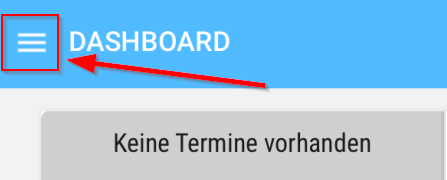
1. Please start the DeDeSales app and open the Main Menu via the citizen menu.
 

![Ein Bild, das Text, Screenshot, Schrift, Logo enthält.  Automatisch generierte Beschreibung](https://en.wiki.dedesales.de/uploads/images/gallery/2026-08/GHlNvLPSOnSN4p9t-tzy76byfzpjrecdj-embedded-image-a9gjb1pq.png)

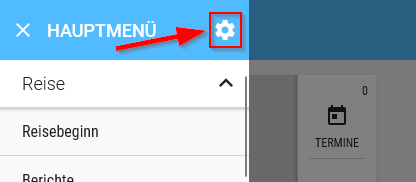
1. In the Main Menu, open the Settings via the gear icon.
 

![Ein Bild, das Text, Screenshot, Schrift, Software enthält.  Automatisch generierte Beschreibung](https://en.wiki.dedesales.de/uploads/images/gallery/2026-08/7cN83ok9Bo1m0OfA-hful889dm2wrmgnb-embedded-image-ixfdo7ls.png)

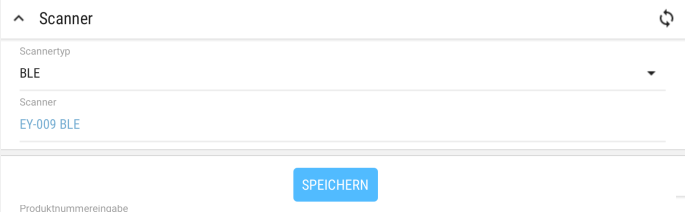
1. In the Settings, select BLE under Type of scanner and select your EY-009 BLE under Scanner. Finally, click Save at the very bottom. (On Windows and Android, the Type of scanner option does not exist.)
 

![Ein Bild, das Text, Reihe, Schrift, Screenshot enthält.  Automatisch generierte Beschreibung](https://en.wiki.dedesales.de/uploads/images/gallery/2026-08/BZGi3eVg6fP93vps-wrqq0eqcwgdghqg5-embedded-image-fnmwfafn.png)

1. The scanner is now connected to DeDeSales and ready for use.
 

# <a></a>Offline Scan Function

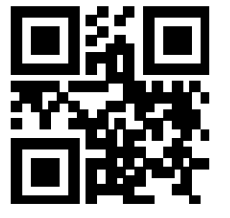
1. To activate the Offline Scan function (the scanner does not need to be reconnected), the "Storage mode" QR code must be scanned:
 

Storage mode:
![Ein Bild, das Muster, Quadrat, Kunst, Symmetrie enthält.  KI-generierte Inhalte können fehlerhaft sein.](https://en.wiki.dedesales.de/uploads/images/gallery/2026-08/XMFyxP0ApQKCQldY-b6mnyk0zfmcgmyov-embedded-image-awew10zx.png)

1. All subsequently scanned barcodes will be stored on the scanner.
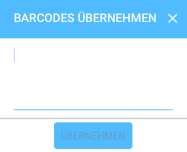
2. To transfer the barcodes, click on Transfer barcodes in the client.
 

![Ein Bild, das Screenshot, Rechteck, Grafiken, Symbol enthält.  KI-generierte Inhalte können fehlerhaft sein.](https://en.wiki.dedesales.de/uploads/images/gallery/2026-08/jlrIHw3rmWfHFoCL-lrqtqigjo0caz7j7-embedded-image-kiaowpvo.png)

1. After the "Transfer barcodes" window has opened, you can transfer the scanned barcodes via the QR code. For this, scan the "Data upload" QR code.
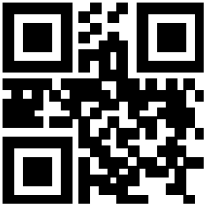
 

![An image containing pattern, square, symmetry, art. AI-generated content may be inaccurate.](https://en.wiki.dedesales.de/uploads/images/gallery/2026-08/QorBQeK2Q5MEth7u-vdhfzrjo5ikcaj0e-embedded-image-arwtmfi6.png)Data Upload:

![Ein Bild, das Text, Screenshot, Schrift, Rechteck enthält.  KI-generierte Inhalte können fehlerhaft sein.](https://en.wiki.dedesales.de/uploads/images/gallery/2026-08/rCDXy6uXVqcUa7yg-lrtchpiptovjnnps-embedded-image-xr0coxkp.png)

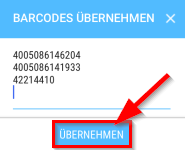
1. After the barcodes have been transferred, you can click on "Apply" and the barcodes will be transferred.
 

![Ein Bild, das Text, Screenshot, Schrift, Reihe enthält.  KI-generierte Inhalte können fehlerhaft sein.](https://en.wiki.dedesales.de/uploads/images/gallery/2026-08/JPlMQSZcuTaurbGk-umdvvbnhyyezfhbl-embedded-image-77xs3iim.png)

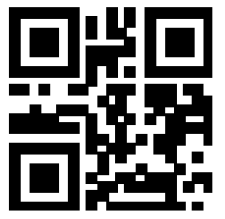
1. After all data has been successfully transferred, you can delete the barcodes from the scanner via the "Delete data" QR code; otherwise, they will be transferred again.
 

Delete data:
![Ein Bild, das Muster, Quadrat, Symmetrie, Rechteck enthält.  KI-generierte Inhalte können fehlerhaft sein.](https://en.wiki.dedesales.de/uploads/images/gallery/2026-08/d9gW4LCEd0lz9JWa-5zt6dvo4wxgblqx9-embedded-image-53qc9bfn.png)

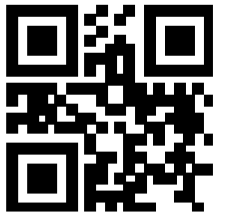
1. Barcode to reactivate the normal scan mode:
 

Normal mode:
![Ein Bild, das Muster, Quadrat, Symmetrie, Kunst enthält.  KI-generierte Inhalte können fehlerhaft sein.](https://en.wiki.dedesales.de/uploads/images/gallery/2026-08/NmZn01pM8XccIzzy-qyi3on0lzcktjscc-embedded-image-fazz5av9.png)

# Troubleshooting

1. If necessary, the scanner can be reset to factory settings via this barcode. The initial setup may need to be performed again afterwards.
 

1. When the scanner is connected to the device for the first time, the barcode from the manual must be used. Pairing via the device functionality (press button for 8 seconds) does not work because HID mode is activated there.