# Filter

### Filter [![tlsPBxKcQq6BcmTM-embedded-image-z5dqkbgv.png](https://en.wiki.dedesales.de/uploads/images/gallery/2026-09/h51hePPIV2tbCTeS-l6itl40jnllcwvre-tlspbxkcqq6bcmtm-embedded-image-z5dqkbgv.png)](https://wiki.dedesales.de/uploads/images/gallery/2025-04/L6ITl40JNLLcwvre-tlspbxkcqq6bcmtm-embedded-image-z5dqkbgv.png)


The filter icon is located in various places. Here you can filter the view as desired. The fields to be filtered must first be set as filterable via the grid menu,

Filters are not retained after leaving the page and must be activated anew each time.

The filter function is opened by the corresponding filter symbol on the right side in the Search line.

<table id="bkmrk-das-filter-symbol-is" style="height: 643px; width: 156.667%;"><colgroup><col style="width: 50.0596%;"></col><col style="width: 50.0596%;"></col></colgroup><tbody><tr><td>[![Filter aus.jpg](https://en.wiki.dedesales.de/uploads/images/gallery/2026-10/scaled-1680-/cokGG5RBL916IdAl-filter-aus.jpg)](https://en.wiki.dedesales.de/uploads/images/gallery/2026-10/cokGG5RBL916IdAl-filter-aus.jpg)

</td><td>[![2026-10-26 11&#95;30&#95;54-DeDeSales.jpg](https://en.wiki.dedesales.de/uploads/images/gallery/2026-10/scaled-1680-/oR6YwFgWAtoO4VoR-2026-10-26-11-30-54-dedesales.jpg)](https://en.wiki.dedesales.de/uploads/images/gallery/2026-10/oR6YwFgWAtoO4VoR-2026-10-26-11-30-54-dedesales.jpg)

</td></tr><tr><td>The filter symbol is black, i.e. no filter is active.</td><td>The filter symbol is green, i.e. a filter is active.</td></tr></tbody></table>

### Filter Settings

<table id="bkmrk-icon-leiste-xschlie%C3%9F" style="height: 991px; width: 96.6667%;"><colgroup><col style="width: 49.9259%;"></col><col style="width: 50.0741%;"></col></colgroup><tbody><tr><td>[![Filter Einstellungen 1.jpg](https://en.wiki.dedesales.de/uploads/images/gallery/2026-10/scaled-1680-/B5dIAt54vEoMTulc-filter-einstellungen-1.jpg)](https://en.wiki.dedesales.de/uploads/images/gallery/2026-10/B5dIAt54vEoMTulc-filter-einstellungen-1.jpg)

</td><td>

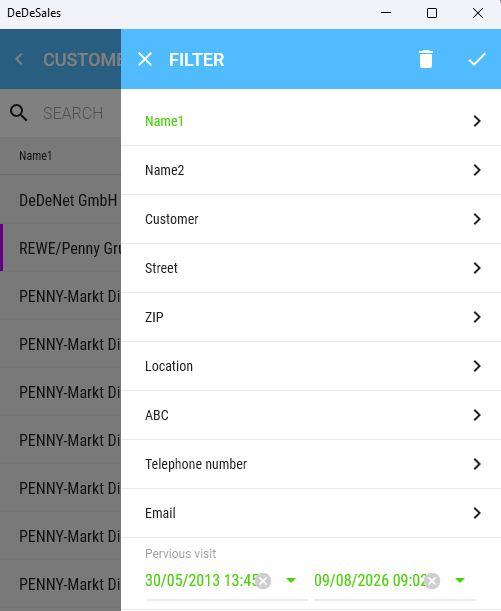
1. Icon bar 
    1. X  
        Closes the filter without applying any Amendments.
    2. Trash bin  
        Resets the filter.
    3. Check mark  
        Confirms your filter settings and closes the filter settings.
2. Columns 
    1. Text columns  
        Are shown on the right with an arrow. There you can make your filter settings.
    2. Number columns  
        Have a From and until Value as filter criteria.
    3. Date columns  
        Have a From and until Period as filter criteria.
3. General 
    1. Only columns that can currently be filtered, i.e. contain at least two different Values, are displayed. This also means that the filter window may contain no Selection.
    2. Green Entries mean that these Values are currently being filtered.

</td></tr><tr><td>[![Filter Einstellungen 2.png](https://en.wiki.dedesales.de/uploads/images/gallery/2026-10/scaled-1680-/XG1QWmQ7sJ3FZZgI-filter-einstellungen-2.png)](https://en.wiki.dedesales.de/uploads/images/gallery/2026-10/XG1QWmQ7sJ3FZZgI-filter-einstellungen-2.png)

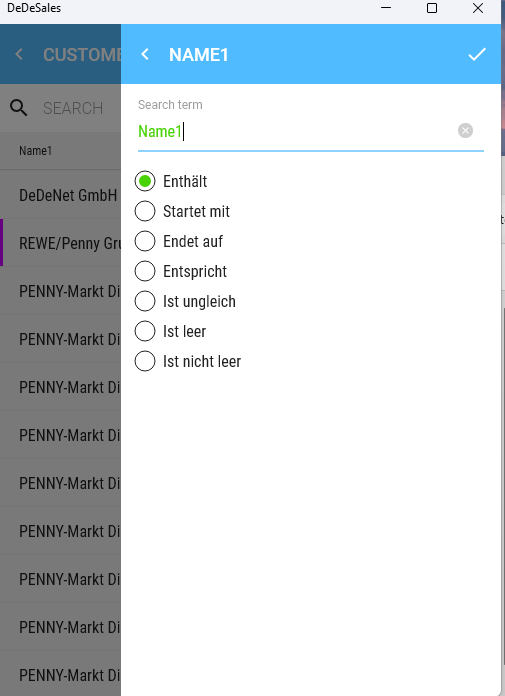
</td><td>The text column "Name 1" has been selected for filtering.

If no more than 25 different contents are available in a text column, you will receive a multiple-choice selection; otherwise, a text input with search conditions (see left).

</td></tr></tbody></table>