# Trigger
Triggers can be defined to execute automatic actions in DeDeSales, e.g. calling a website, creating an activity, or sending an email.
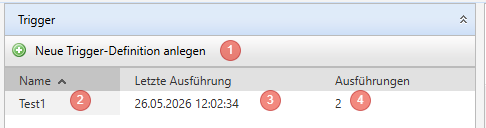
1. Use the green plus to create a new definition
2. Click on an existing trigger to edit it
3. In the summary you can see when the last execution was
4. The quantity shows how often the trigger has been activated
##### Basic
1. Set the name of the trigger
2. Set the secret
3. Set the type of the trigger
4. Depending on the type, enter the corresponding URL or the corresponding picture
##### Possible actions that can be executed:
- Create activity
- Edit lead
- Send email
Here you must fill in the fields according to your wishes.
### How the trigger is activated
A trigger is always activated only once. So if a picture is shown multiple times or a link is clicked multiple times, the action will only be triggered once.
A URL is required to activate the trigger. The URL is composed as follows:
https://{ihre-dedesales-backend-url}/trigger/{guid des triggers}?j={base64 kodierte Json Daten}&h={hash}
#### Your DeDeSales Backend URL
Please take this from the browser when you access the backend. Note that you have a URL for the test and the live system. You must use the URL where you also created the trigger.
#### Guid of the trigger
You can see the guid of the trigger when you open the trigger in the backend.
[](https://wiki.dedesales.de/uploads/images/gallery/2026-06/KTos8lFPHUD9uApM-image.png)
#### Base64 encoded Json data
So that DeDeSales can correctly process the data when the trigger is called, information must be provided as a Json object.
{
"contactId": "K10001",
"customerId": "K10002",
"leadId": "4234-234234343-234324-234",
"employeeNr": "99990"
}
##### contactId
The contact number of the contact.
##### customerId
The customer number.
##### leadId
The guid of the lead. Only required if you have chosen Edit lead as the action.
##### employeeNr
The number of the employee from the DeDeSales backend under which the action is executed.
##### Hash
The hash is there to prevent triggers from being activated by mistake. The hash is an MD5 hash. It is created from the following string {base64 encoded Json data}{secret}
You specify the secret when creating the trigger in the DeDeSales backend.
If the hash does not match the value determined in DeDeSales, an error 500 will be returned when the URL is called.